Oolook vs Adobe Express

Do You Need an Adobe Design Workspace or a Connected Marketing Execution Platform?

Adobe Express connects Firefly AI, templates, Adobe Stock, image and video editing, Brand Kits, collaboration, and light social scheduling. Oolook connects structured brand context, creative generation, media processing, social execution, reporting, and SEO content.

Comparison researched and reviewed on October 1, 2026

The short answer

Choose Based on Whether Design Production or Marketing Execution Is the Priority

Adobe Express is design-first and deeply connected to the Adobe ecosystem. Oolook is designed to connect brand context, creative assets, social publishing, reporting, and search content.

Choose Oolook for connected brand and social execution

Oolook is the stronger fit when you need workspace-aware Copilot actions, coordinated carousel and moodboard generation, destination controls, platform validation, publishing statuses, social reports, and SEO article workflows.

Choose Adobe Express for design, Firefly, Stock, and Creative Cloud

Adobe Express is the stronger fit when templates, Adobe Stock, Firefly image or video generation, professional asset integration, PDFs, presentations, print, or Creative Cloud workflows are central requirements.

Feature comparison

Oolook vs Adobe Express at a Glance

Compare what each product contributes to brand management, AI generation, visual editing, assets, collaboration, social scheduling, reporting, SEO, and cost.

Decision areaOolookAdobe Express
Best suited toTeams that want brand workspaces, creative generation, media processing, connected social publishing, reporting, and SEO execution.Individuals, teams, and enterprises that prioritize template-driven design, Adobe Stock, Firefly AI, Creative Cloud assets, presentations, PDFs, and visual collaboration.
Operating modelUses separate brand workspaces containing Brand Kit context, media, profiles, posts, reports, and search projects.Uses personal or team Projects, Brands, Libraries, templates, designs, folders, cloud documents, and Creative Cloud assets.
Brand KitsStructured Brand Kit information guides supported Copilot, social, creative, media, and SEO workflows.Brands store logos, colors, fonts, graphics, images, templates, palettes, and selected controls for visual consistency.
Brand voiceSupports tone, audience, positioning, writing preferences, visual direction, and reusable marketing context.Visual brand controls are strong, but equivalent first-class audience, positioning, and marketing-instruction fields were not verified.
AI assistantCopilot can inspect available workspace information and prepare supported actions for confirmation.AI Assistant can understand the current design, generate layouts and templates, edit layers, replace content, restyle assets, and apply a Brand.
Action controlSupported workspace changes are presented for confirmation before execution.Users can switch between conversational and manual editing. Autonomous marketing publishing or workspace-wide execution was not verified.
Caption generationGenerates captions and variants using supported brand and destination context.Provides Caption Writer, Rewrite, Translate, templates, and AI-assisted social copy inside design workflows.
AI imagesProvides prompt and reference-based image generation with aspect ratios, model choices, resolutions, and multiple outputs.Firefly supports text-to-image, Generate Similar, Generative Fill, Remove, Expand, brand application, and partner-model access on eligible plans.
AI videoVideo processing is established, while unrestricted video generation is not positioned as an advantage.Firefly supports text-to-video and image-to-video generation for short creative clips, subject to premium generative credits.
Carousel creationProvides coordinated multi-card generation from topic, website, references, platform, and Brand Kit context.Supports multi-page carousel creation through templates, AI generation, resizing, and manual editing.
MoodboardsCan analyze image references and produce reusable visual direction.Moodboards can be manually assembled with templates, but a comparable reference-analysis workflow was not verified.
Image processingIncludes background removal, resizing, reframing, palette extraction, color grading, and image upscaling.Provides cropping, resizing, background removal, object removal, Generative Fill, Expand, filters, effects, adjustments, transparency, layers, and upscaling-related tools.
Video processingIncludes video background removal and video upscaling within established media workflows.Provides timeline and scene editing, trimming, splitting, merging, transitions, captions, audio, speech enhancement, video background removal, covers, and high-resolution export.
Asset ecosystemMedia Library focuses on brand-specific uploads, generated outputs, processing, search, organization, and reuse.Provides Adobe Stock, Adobe Fonts, templates, Creative Cloud Libraries, Team Libraries, cloud documents, and enterprise AEM connections.
Templates and stockFocuses on generated and uploaded brand assets rather than a massive template or stock marketplace.Offers extensive free and premium templates, Adobe Stock photos, video, audio, graphics, design assets, and fonts.
CollaborationSupports shared-content feedback and plan-dependent team workflows.Provides real-time co-editing, comments, mentions, review links, shared libraries, locked templates, version history, and higher-tier approvals.
Social schedulingSupports drafts, immediate publishing, scheduling, destination controls, validation, queues, retries, and status monitoring.Content Scheduler supports drafts, previews, immediate or scheduled publishing, shared calendars, and multiple connected accounts.
Publishing depthProvides destination-specific captions, media, settings, platform validation, retries, and detailed publishing states.Scheduling is design-led. Comparable queue, retry, first-comment, best-time, and destination-specific control depth was not fully verified.
Social analyticsProvides available profile and post metrics from supported connected networks.Native social analytics are limited, with broader reporting available through the Metricool add-on.
EngagementA mature unified Inbox is not positioned as an established advantage.A native full social Inbox for comments, direct messages, mentions, assignments, and listening was not verified.
Adobe ecosystemProvides a focused marketing workspace rather than a general professional creative ecosystem.Connects with Photoshop, Illustrator, Premiere Pro, Acrobat, Lightroom, Adobe Stock, Fonts, Libraries, AEM, GenStudio, and Firefly Services.
SEO content workflowSupports researched article generation, evaluation, editing, reevaluation, and optimization.Supports web pages, writing assistance, and basic metadata, but a comparable SEO research, scoring, audit, and optimization workflow was not verified.
Free accessOffers an available Free plan, with current limits loaded from the pricing API.Offers a permanent Free plan with basic creative tools, limited generative access, one connected account per supported network, and reviewed 5 GB storage.
Pricing basisPlans scale through workspaces, profiles, posts, storage, AI credits, reports, and support.Premium is per person, Teams is per seat, Enterprise is sales-led, and premium Firefly generation can require additional plans or credits.

Product names, plans, prices, network APIs, AI limits, add-ons, and commercial terms can change. Confirm purchase-critical requirements on each vendor's current official pages.

Oolook Copilot in action

Create a Brand-Aware Visual and Put It to Work

Move from a clear creative brief to generated visual assets, review, destination-specific copy, and publication. See how this connected Oolook workflow relates to teams evaluating Adobe Express.

Oolook Copilot

Brand-aware content preparation

Working in: Alder & Form
Ask anything
Brand details shown here are fictional. Actual output uses available information from the selected Brand Kit.
Generate the visual assetsReview and select the outputAdd copy and prepare publication
  1. 1

    Step 1

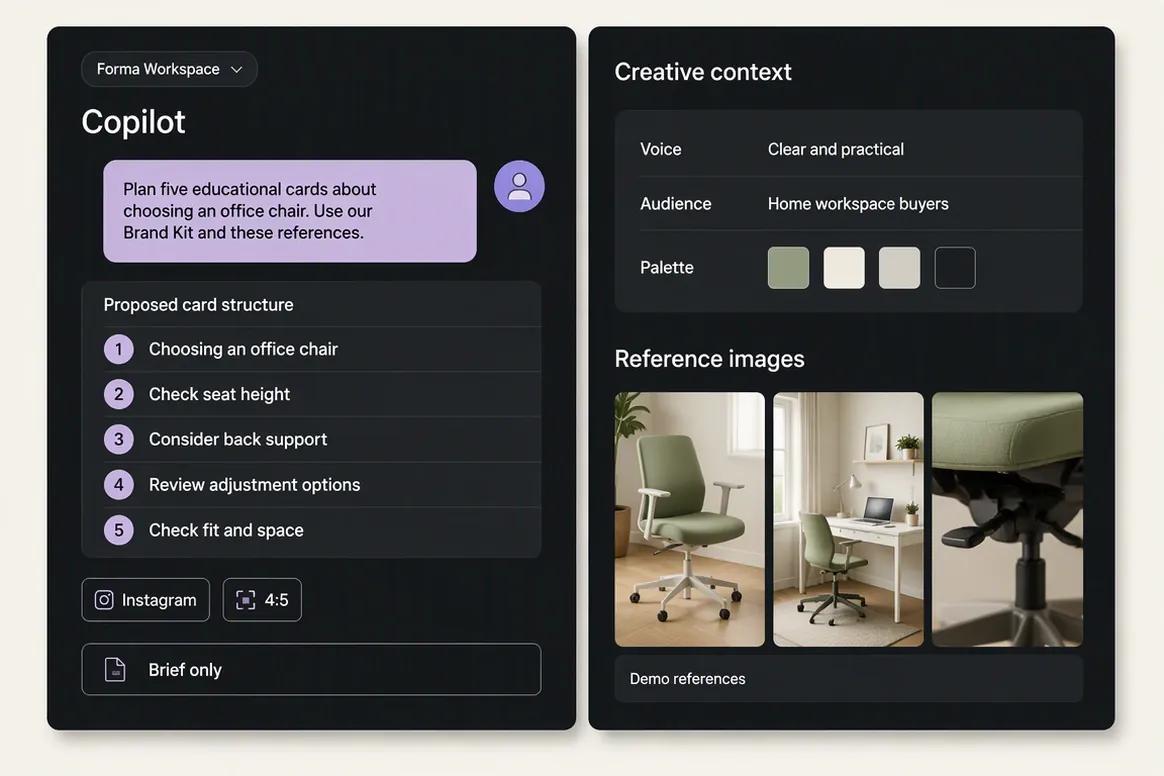
    Define the creative brief with Copilot

    Tell Copilot the visual's purpose, audience, format, message, and intended destination. Include Brand Kit context and reference images when they are relevant to the required visual direction.

    Ask Oolook Copilot
    “Help me prepare a five-card educational carousel about choosing the right office chair. Use our Brand Kit and these reference images.”
    Oolook Copilot preparing a brand-aware carousel brief
  2. 2

    Step 2

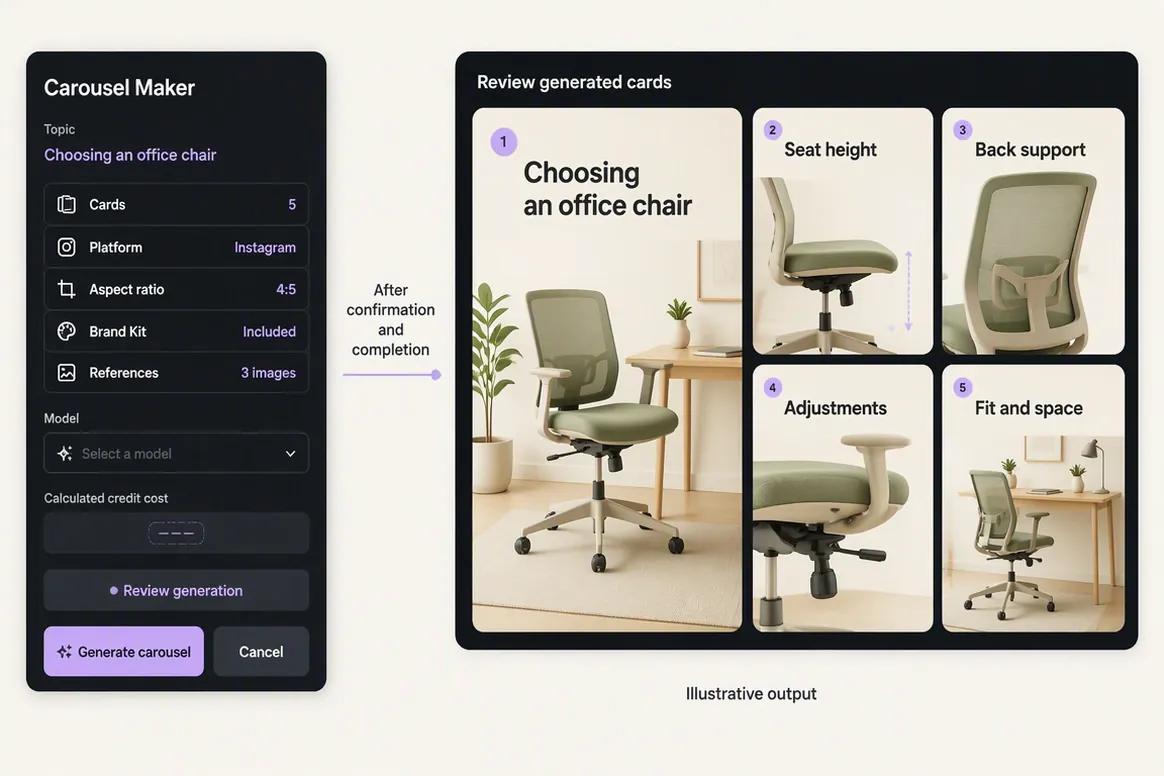
    Generate the visual assets

    Review the proposed structure and continue into the supported image or carousel generation workflow. Select the model, aspect ratio, resolution, reference images, and output count required for the creative.

    Ask Oolook Copilot
    “Prepare the carousel generation workflow using this approved card structure and visual direction.”
    Oolook generating coordinated visual assets for a social carousel
  3. 3

    Step 3

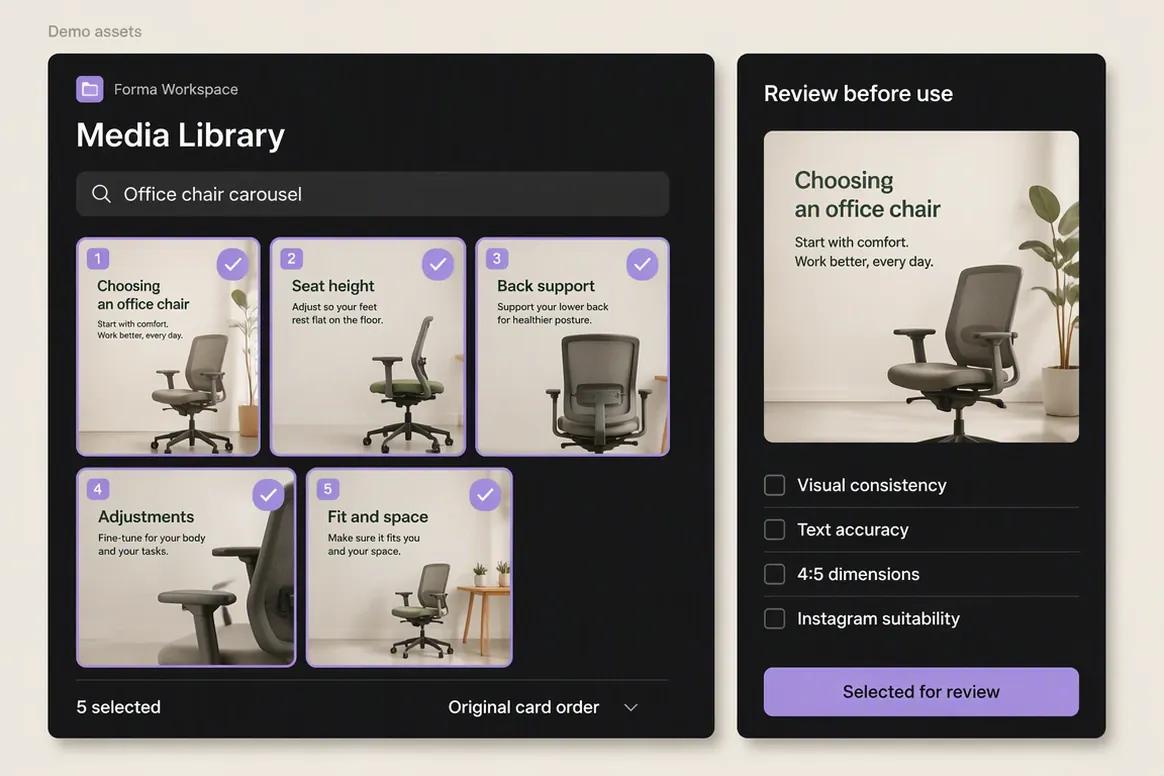
    Review and select the output

    Inspect visual consistency, text accuracy, composition, dimensions, and destination suitability. Save the approved generated outputs to the selected brand's Media Library for reuse.

    Ask Oolook Copilot
    “Find the generated carousel cards, check that the complete set is available, and help me prepare the selected assets for Instagram.”
    Oolook Media Library containing reviewed generated carousel assets
  4. 4

    Step 4

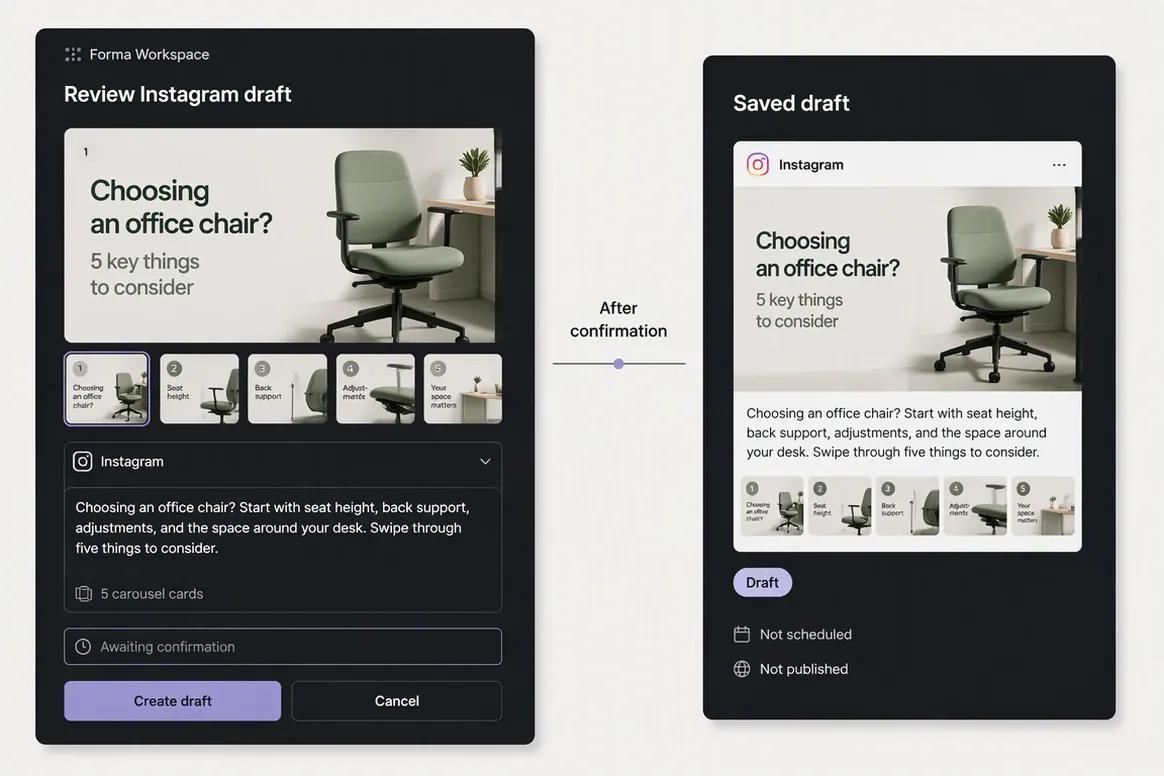
    Add copy and prepare publication

    Ask Copilot to prepare the destination-specific caption and publishing draft. Review the creative, caption, settings, and scheduled time together before confirming the action.

    Ask Oolook Copilot
    “Draft an Instagram caption for this carousel and prepare the complete post for review.”
    Oolook Instagram draft containing generated carousel cards and caption

Keep the Work Connected With Oolook Copilot

Move from brand context to reviewable content and supported actions without rebuilding the same marketing context across disconnected tools.

Start With Oolook

Why teams choose Oolook

Connect Creative Production to the Full Brand Workflow

Oolook connects structured brand context, coordinated creative production, media processing, controlled publishing, reporting, and search-content execution.

Give Copilot structured workspace context

Oolook Copilot can work with available Brand Kit information, media, connected profiles, drafts, schedules, reports, search projects, and application history.

Review supported actions before execution

Oolook separates recommendations from workspace changes. Supported actions are prepared for confirmation so your team can inspect what will happen before execution.

Create coordinated brand assets

Generate images with references, coordinated carousel cards, and visual direction inside the selected brand workspace.

Process and reuse existing media

Find an existing asset, then resize, reframe, upscale, remove its background, extract its palette, or adjust its colors without leaving the Media Library.

Connect social execution with SEO content

Continue into researched article generation, evaluation, editing, reevaluation, and optimization without rebuilding the brand context in another product.

Where Adobe Express is stronger

Adobe Express Is Built for Fast Visual Production Inside the Adobe Ecosystem

Adobe Express has clear advantages when templates, stock assets, Firefly generation, professional creative integrations, collaboration, PDF workflows, and commercial-use confidence are central requirements.

Adobe Firefly image and video generation integrated into the editor.
Commercial-safety positioning and Content Credentials for eligible generated content.
Extensive Adobe Stock photos, videos, audio, graphics, and design assets.
Adobe Fonts and deep Creative Cloud Libraries integration.
Photoshop, Illustrator, Premiere Pro, Acrobat, Lightroom, AEM, and GenStudio connections.
Strong image editing with background removal, Generative Fill, Remove, Expand, filters, and effects.
Strong video editing with captions, audio, transitions, trimming, and premium background removal.
Large template ecosystem for social, ads, presentations, PDFs, flyers, and campaigns.
Real-time collaboration, locked templates, brand controls, and enterprise administration.
Permanent Free plan plus Premium, Teams, Firefly, Creative Cloud, and Enterprise paths.

Workflow comparison

Two Different Ways to Move From Brand Setup to Published Content

Oolook starts with a selected brand workspace and connects content to social and SEO execution. Adobe Express starts with design, Firefly generation, templates, Stock assets, collaboration, export, and light scheduling.

With Oolook

  1. 1Create a dedicated workspace for the brand.
  2. 2Configure structured Brand Kit information.
  3. 3Connect supported profiles and organize reusable media.
  4. 4Ask Copilot to inspect workspace information or prepare content.
  5. 5Generate captions, images, carousels, or visual direction.
  6. 6Process existing media when new generation is unnecessary.
  7. 7Review captions, media, and supported settings by destination.
  8. 8Confirm supported actions and monitor publication status.
  9. 9Review reports or continue into an SEO article workflow.

With Adobe Express

  1. 1Create or join an Adobe Express team or organization.
  2. 2Configure Brands, Libraries, templates, colors, fonts, and assets.
  3. 3Choose a template or begin with AI Assistant or Firefly.
  4. 4Generate or edit text, images, video, audio, and design elements.
  5. 5Apply brand styling, resize, translate, and repurpose the asset.
  6. 6Collaborate through comments, links, libraries, or approvals.
  7. 7Export, share, print, or schedule through Content Scheduler.
  8. 8Use Creative Cloud applications when deeper professional editing is needed.
  9. 9Use Firefly Services, AEM, GenStudio, or APIs for enterprise-scale workflows.

Current pricing

Compare Plans Against Your Real Monthly Workload

Compare the brands, social profiles, posts, storage, AI credits, reporting, and support your team actually needs.

Current Oolook plans

Loaded from Oolook's pricing API when this page opens.

Open the standard pricing page

Loading current Oolook plans…

Adobe Express plans

Public pricing reviewed on October 1, 2026.

Check current Adobe Express pricing

Adobe Express Free

$0

Includes core design tools, limited daily generative access, one connected account per supported social network, reviewed 5 GB storage, free templates and Stock content, and basic collaboration.

Adobe Express Premium

About $9.99/month or $99.99/year

Includes reviewed 250 generative credits monthly, Premium templates and Adobe Stock assets, Brand Kits, up to 3 accounts per supported network, Remove Video Background, one-click Resize, 100 GB storage, and 30-day version history.

Adobe Express Teams

Introductory pricing from about $4.99/seat monthly

Adds team administration, Brand controls, locked templates, asset ownership and reclamation, collaboration, and higher shared storage. Introductory and renewal pricing can differ, so verify the active contract.

Adobe Express Enterprise

Custom pricing

Sales-led plan for SSO, SCIM, audit controls, AEM, Custom Models, advanced security, governance, support, enterprise administration, and eligible IP-indemnification terms.

Adobe Express Firefly Pro

About $19.99/month

Reviewed plan includes Adobe Express Premium, higher Firefly usage with around 4,000 monthly generative credits, and selected Photoshop web or mobile access. Verify the current regional bundle.

Do not compare price without comparing usage

Oolook plans scale through brand workspaces, profiles, posts, storage, AI credits, reports, and support. Adobe Express plans scale through users, storage, Brand features, Stock access, collaboration, generative credits, premium Firefly tools, Creative Cloud access, and enterprise governance. Compare your brands, users, design volume, premium assets, video generation, social-publishing depth, media processing, analytics, and SEO requirements.

Adobe Express prices and limits can change after the research date. Oolook values are loaded from its pricing API. Currency conversions outside INR are approximate. Confirm taxes, promotions, add-ons, checkout currency, and final billing terms before purchasing.

Make the decision

Do Not Confuse Design Depth With Marketing Execution

Adobe Express earns its place when Firefly, Stock, templates, professional creative integrations, collaboration, and visual production matter. Oolook becomes more relevant when brand context, destination-specific publishing, platform control, social reports, and SEO execution must remain connected.

Oolook is likely the better fit if:

  • You want marketing operations separated by brand workspace.
  • You need Copilot to inspect available workspace information.
  • You want supported actions presented for confirmation.
  • You need coordinated carousel generation and reference-based moodboards.
  • You need destination-specific social content and publishing controls.
  • Platform validation, queue states, retries, and statuses matter.
  • You want social publishing, reports, and SEO execution together.

Adobe Express is likely the better fit if:

  • Adobe Stock and templates are central to your visual workflow.
  • You already use Creative Cloud applications and Libraries.
  • Firefly commercial-safety positioning affects your purchase.
  • You need fast image and video editing for non-designers.
  • Presentations, PDFs, flyers, web pages, or print are important.
  • Brand controls, locked templates, and enterprise administration matter.
  • Light social scheduling is enough for your publishing workflow.

Questions before you choose

Oolook vs Adobe Express FAQs

Straight answers to the practical questions buyers ask before choosing between Oolook and Adobe Express.

What is the main difference between Oolook and Adobe Express?+

Adobe Express is a design-first platform for images, video, templates, Stock assets, presentations, PDFs, collaboration, and light scheduling. Oolook is a brand-aware marketing execution workspace connecting creative generation, media processing, social publishing, reporting, and SEO article workflows.

Is Oolook an Adobe Express alternative?+

Yes, for buyers comparing Brand Kits, AI images, carousels, media tools, social content, and scheduling. It is not a complete replacement for Adobe Stock, Creative Cloud applications, PDFs, presentations, or enterprise Adobe workflows.

Does Adobe Express have a permanent free plan?+

Yes. Adobe Express Free includes core design tools, limited generative access, free templates and assets, basic scheduling, and reviewed 5 GB storage.

Can Adobe Express generate AI images and videos?+

Yes. Firefly supports text-to-image, Generative Fill, Remove, Expand, Generate Similar, text-to-video, and image-to-video workflows. Premium features consume generative credits.

Is Adobe Firefly commercially safe?+

Adobe positions Firefly as designed for commercial safety. Content Credentials and selected enterprise IP-indemnification options are available, subject to Adobe terms.

Can Adobe Express remove image and video backgrounds?+

Yes. Image background removal is available, and Remove Video Background is included on eligible paid plans.

Can Adobe Express schedule social posts?+

Yes. Content Scheduler supports planning, drafting, immediate publishing, and scheduled publishing to supported social channels. Advanced social-management capabilities are more limited.

Does Adobe Express provide a social inbox?+

A native full Social Inbox for direct messages, comments, mentions, assignments, and listening was not verified.

Which product has stronger professional design integrations?+

Adobe Express is stronger when Photoshop, Illustrator, Premiere Pro, Acrobat, Lightroom, Adobe Stock, Fonts, Libraries, AEM, or GenStudio are required.

Which product has stronger social execution?+

Oolook is likely stronger when destination-specific captions and media, platform validation, queues, retries, publishing states, and connected social reports are required.

Which product has stronger SEO tools?+

Oolook supports researched article generation, evaluation, editing, reevaluation, and optimization. A comparable native SEO content workflow was not verified for Adobe Express.

Can I migrate automatically from Adobe Express to Oolook?+

No one-click migration was verified. Migration would likely require exporting designs and assets, recreating Brand Kits and workspaces, reconnecting social profiles, and rebuilding scheduled content.

Research and sources

Check the Details That Matter to Your Purchase

This comparison uses established Oolook product information and official Adobe Express, Firefly, Content Scheduler, Brand, pricing, Help Center, Creative Cloud, and enterprise sources.

Adobe Express is a trademark of its respective owner. Oolook is not affiliated with or endorsed by Adobe Express. Product capabilities, plans, prices, limits, AI terms, integrations, and policies can change. Confirm current official information before purchasing. If you identify an inaccurate statement, contact Yogesh@oolook.in.

Build around the brand

Connect Brand Context, Creative Production, Media, and Execution

Use Oolook to connect your Brand Kit, Copilot, creative tools, reusable Media Library, social publishing, reporting, and SEO content workflows.