Choose Oolook for creation and marketing execution
Oolook is the stronger fit when you need captions, images, coordinated carousels, moodboards, media processing, social publishing, Copilot actions, and SEO workflows in one brand workspace.
Solutions
Solutions OverviewMarketing AgenciesSmall BusinessesSocial Media ManagersMarketing TeamsContent CreatorsMulti-Brand MarketingBy Outcome
Social Media CampaignsSeasonal MarketingProduct Launch ContentEvent PromotionBrand-Consistent ContentContent RepurposingCross-Platform ContentMarketing Asset ReuseProduct EducationEducational ContentCustomer Story ContentSEO Blog ProductionBlog Content RefreshContent Performance ReviewPricingResourcesCanto helps organizations find, govern, approve, and distribute digital assets at scale. Oolook connects structured brand context, creative generation, media processing, social publishing, reporting, and SEO content.
Comparison researched and reviewed on October 1, 2026
The short answer
Canto is designed for enterprise digital asset management and distribution. Oolook is designed to connect brand context, creative production, media processing, publishing, reporting, and search content.
Oolook is the stronger fit when you need captions, images, coordinated carousels, moodboards, media processing, social publishing, Copilot actions, and SEO workflows in one brand workspace.
Canto is the stronger fit when you need advanced metadata, rights controls, AI Visual Search, external portals, Brand Studio templates, asset approvals, enterprise integrations, and compliance.
Feature comparison
Compare what each product contributes to brand organization, asset discovery, governance, creative production, distribution, publishing, collaboration, and cost.
| Decision area | Oolook | Canto |
|---|---|---|
| Best suited to | Teams that want brand-aware creative production, media processing, social publishing, reporting, and SEO content workflows. | Marketing, brand, creative, and product teams that need enterprise digital asset management, governance, portals, and controlled distribution. |
| Operating model | Uses brand workspaces containing Brand Kit context, media, profiles, posts, reports, and search projects. | Uses a central Main Library, folders, albums, metadata, portals, Style Guides, Brand Studio, and approval workflows. |
| Multi-brand management | Each brand workspace keeps its Brand Kit, Media Library, profiles, content, schedules, and reports separate. | Supports brands and audiences through libraries, portals, Style Guides, permissions, and sales-configured governance. |
| Brand guidance | Structured Brand Kit information guides supported Copilot, creative, social, media, and SEO workflows. | Style Guides and Brand Studio organize logos, colors, fonts, messaging, imagery, and lockable brand templates. |
| Media Library | Provides a brand-specific library for uploaded, generated, and processed marketing assets. | Provides mature DAM capabilities for images, video, audio, documents, PDFs, Adobe files, metadata, versions, relationships, and archive operations. |
| Search | Supports asset search and reuse within the selected brand workspace. | AI Visual Search supports natural-language, visual-similarity, object, facial, OCR, color, and video-frame discovery. |
| Metadata | Provides structured asset records and brand-oriented organization. | Supports tags, keywords, custom fields, taxonomies, controlled vocabularies, Smart Albums, related assets, and automated tagging. |
| Rights management | Enterprise digital-rights governance is not positioned as an Oolook advantage. | Supports usage rights, expiration, copyright data, model releases, approval states, watermarks, download restrictions, and asset activity. |
| Portals | Oolook focuses on internal brand workspaces and connected marketing execution. | Provides branded portals, external sharing, permissions, password protection, expiration, download controls, and partner access. |
| Brand templates | Uses Brand Kit context across supported generation and content workflows. | Brand Studio provides lockable templates, editable regions, InDesign imports, localization, and self-service on-brand creation. |
| AI generation | Generates captions, images, coordinated carousels, and moodboards with brand and reference context. | AI primarily supports search, tagging, enrichment, similarity, organization, template assistance, and approval analysis. |
| Media processing | Includes background removal, resizing, reframing, palette extraction, color grading, and image or video upscaling. | Provides crops, resizing, renditions, conversion, compression, watermarks, focal points, and delivery transformations. |
| Social publishing | Supports drafts, scheduling, immediate publishing, destination controls, validation, retries, and status monitoring. | Native social scheduling and publishing were not documented. The Hootsuite integration makes Canto assets available inside Hootsuite. |
| Social analytics | Provides available profile and post metrics from supported connected networks. | Provides asset, portal, search, download, share, storage, and user-activity analytics rather than native social analytics. |
| SEO workflows | Supports researched article generation, evaluation, editing, reevaluation, and optimization. | A native SEO research, article optimization, or AI-search visibility workflow was not verified. |
| Collaboration | Supports shared-content feedback and reviewable Copilot actions. | Supports comments, annotations, mentions, tasks, Approval Hub, version history, external review, asset requests, and notifications. |
| Distribution | Distributes supported marketing content through connected social publishing workflows. | Media Publisher, CDN delivery, portals, dynamic renditions, embeds, and share links distribute approved assets externally. |
| Integrations | Connects supported marketing, social, reporting, and creative workflows. | Provides Adobe Creative Cloud, Canva, Slack, Hootsuite, API, webhooks, and broader storage or business-system connections. |
| Enterprise governance | Enterprise capabilities depend on current Oolook commercial terms. | Documents SAML SSO, MFA, permissions, audit capabilities, SOC 2 Type 2, ISO 27001, GDPR, and other enterprise controls. |
| Free access | Offers an available Free plan, with current limits loaded from Oolook's pricing API. | No permanent Free plan is published. Access begins through a sales process, demo, or request-based trial. |
| Pricing model | Provides public Free, monthly, annual, and custom Enterprise options. | Uses customized sales-led pricing based on users, storage, portals, capabilities, integrations, onboarding, and add-ons. |
Product names, plans, prices, network APIs, AI limits, add-ons, and commercial terms can change. Confirm purchase-critical requirements on each vendor's current official pages.
Connect asset discovery, media processing, brand-aware content preparation, and distribution inside one workspace. See how this connected Oolook workflow relates to teams evaluating Canto.
Oolook Copilot
Campaign preparation
Step 1
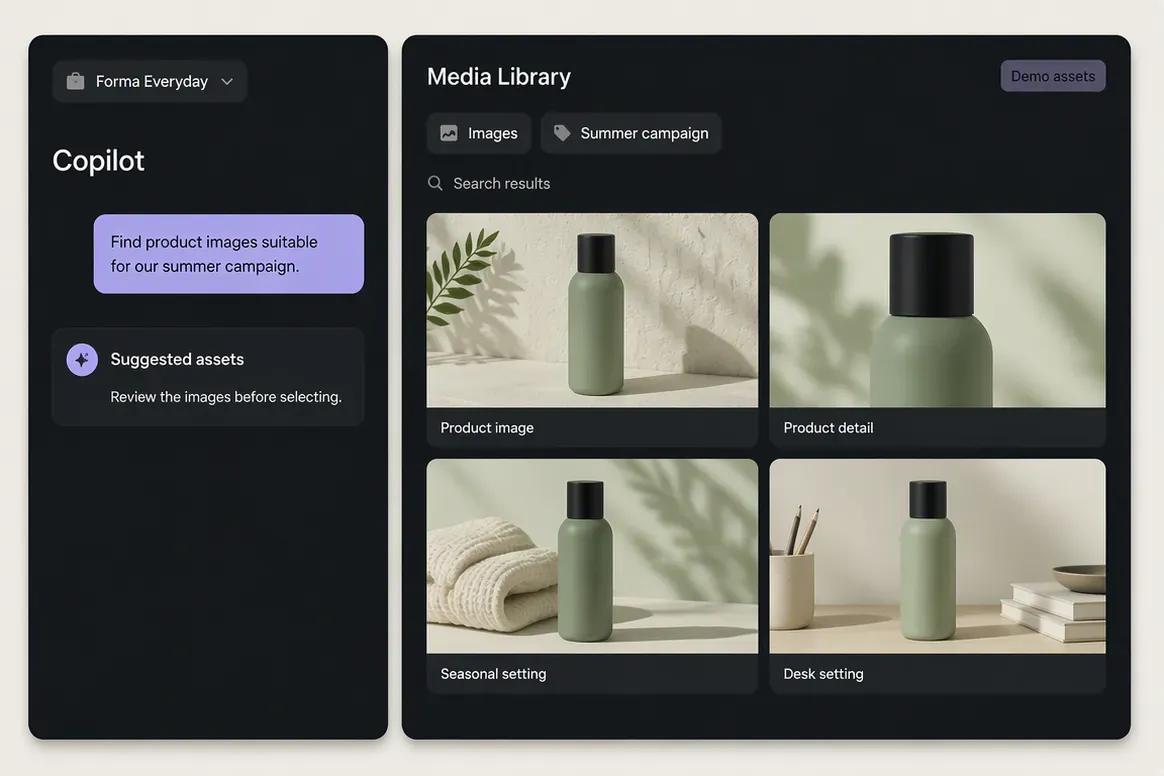
Describe the required asset and its intended use. Copilot can help locate relevant images or videos within the selected brand workspace so the user does not need to manually inspect every file.
“Find product images suitable for our upcoming summer campaign.”
Step 2
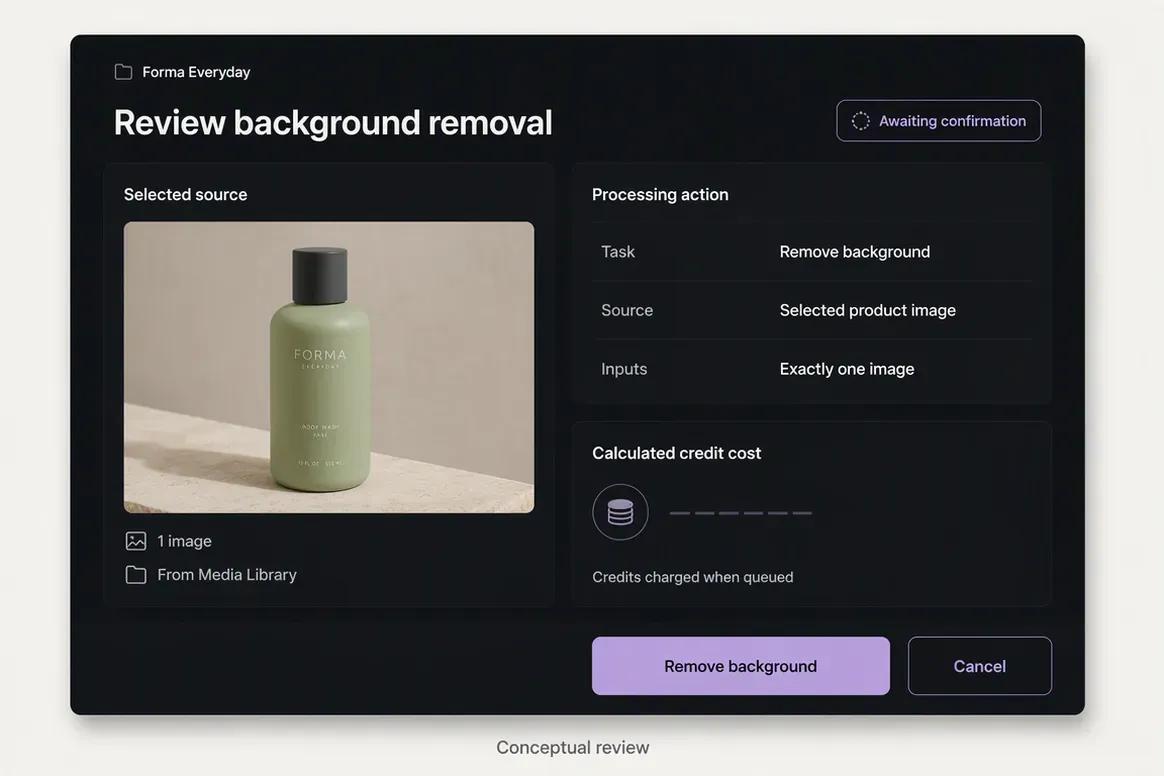
Select the best asset and choose a supported processing operation, such as background removal, resizing, reframing, color grading, or upscaling. Review the action before it runs.
“Prepare background removal for this product image. Show me the action before running it.”
Step 3
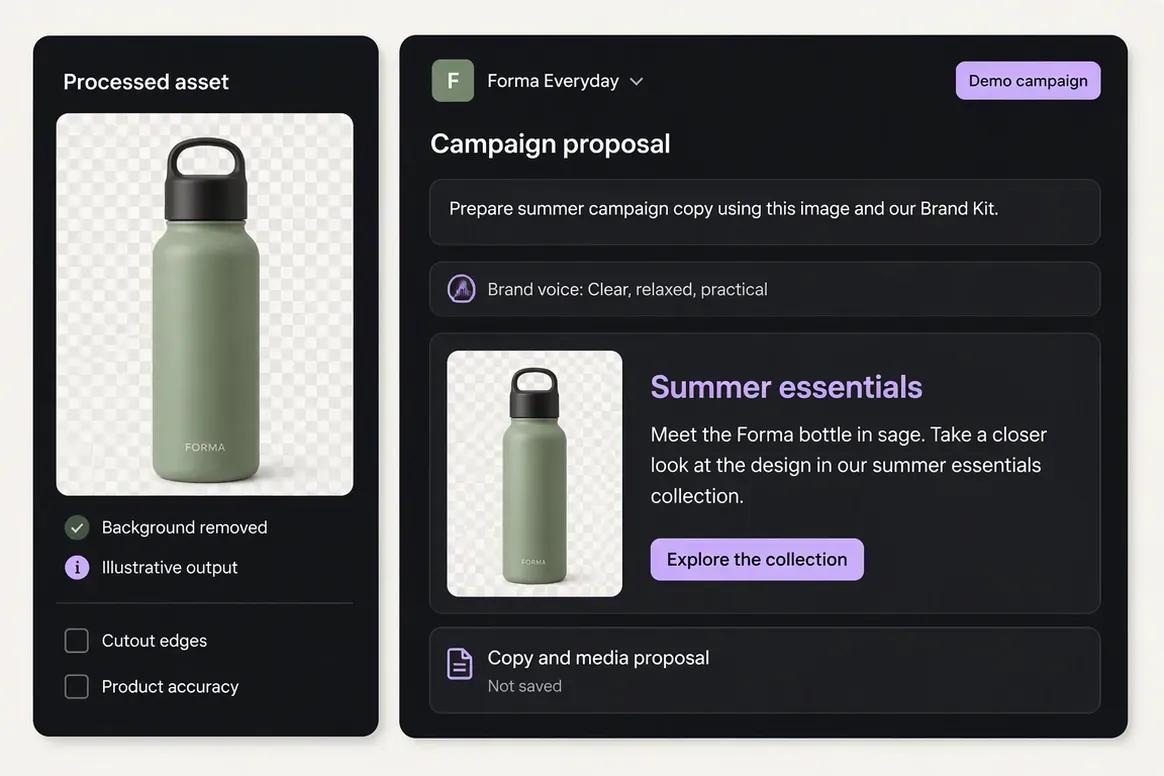
Use Copilot and the available Brand Kit context to prepare campaign copy or a creative brief around the processed asset. Keep the message connected to the selected audience and objective.
“Draft a summer campaign post using this product image and our Brand Kit.”
Step 4
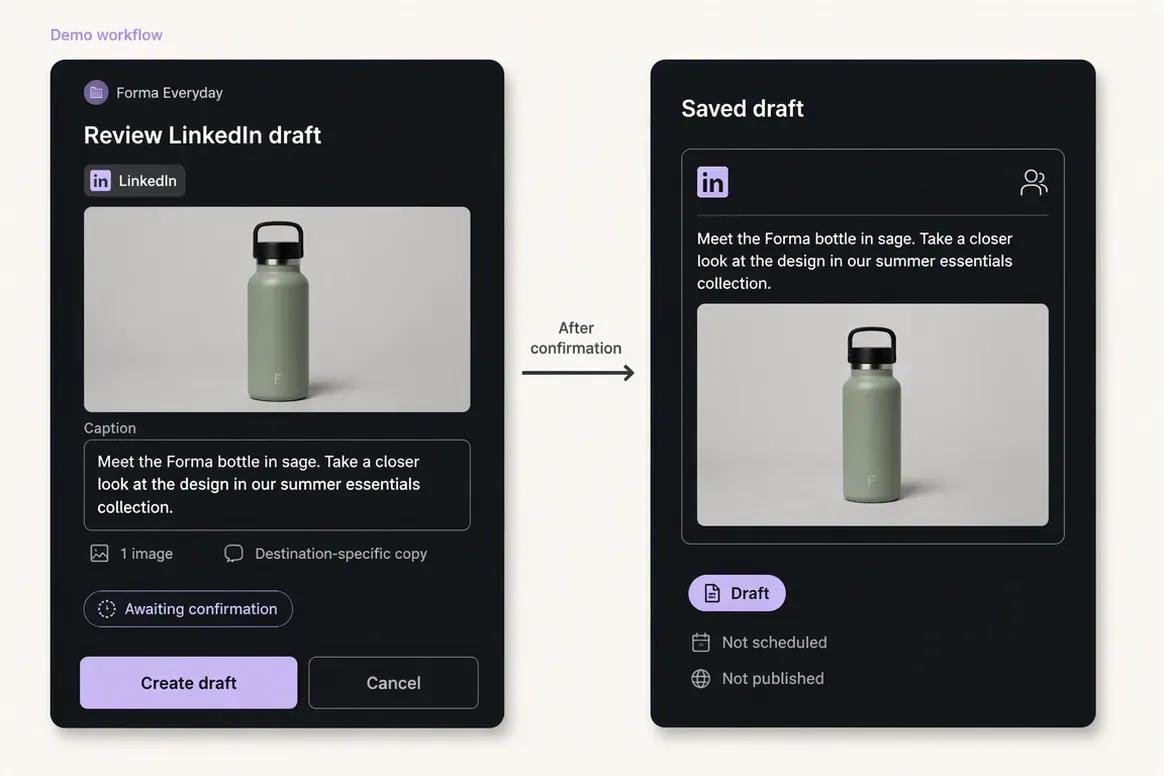
Attach the approved asset to the destination-specific content. Review the caption, media, destination, schedule, and supported settings before confirming publication.
“Prepare this post for LinkedIn and show the complete publishing details for review.”
Move from brand context to reviewable content and supported actions without rebuilding the same marketing context across disconnected tools.
Start With OolookWhy teams choose Oolook
Oolook connects structured brand context, coordinated creative production, media processing, controlled publishing, reporting, and search-content execution.
Oolook Copilot can work with available Brand Kit information, media, connected profiles, drafts, schedules, reports, search projects, and application history.
Oolook separates recommendations from workspace changes. Supported actions are prepared for confirmation so your team can inspect what will happen before execution.
Generate images with references, coordinated carousel cards, and visual direction inside the selected brand workspace.
Find an existing asset, then resize, reframe, upscale, remove its background, extract its palette, or adjust its colors without leaving the Media Library.
Continue into researched article generation, evaluation, editing, reevaluation, and optimization without rebuilding the brand context in another product.
Where Canto is stronger
Canto has clear advantages when the buyer needs mature DAM organization, AI Visual Search, rights management, external portals, Brand Studio, and enterprise controls.
Workflow comparison
Oolook starts with brand context and moves through creation, processing, publishing, and reporting. Canto starts with asset intake and moves through metadata, search, governance, approval, distribution, and reuse.
Current pricing
Compare the brands, social profiles, posts, storage, AI credits, reporting, and support your team actually needs.
Loaded from Oolook's pricing API when this page opens.
Loading current Oolook plans…
Public pricing reviewed on October 1, 2026.
Custom pricing
Sales-configured DAM foundation for secure storage, asset organization, search, permissions, security, and brand consistency. Users, storage, integrations, and onboarding depend on the quote.
Custom pricing
Adds stronger review and approval workflows, AI-assisted organization, customizable portals, and brand-template capabilities. Exact allowances and add-on fees require a sales quote.
Custom pricing
Designed for brand and product content, catalogs, product information, insights, and omnichannel consistency. Commercial terms are sales-led.
Custom pricing
Includes higher-tier AI search and tagging, extensive storage, enterprise integrations, onboarding, training, multilingual support, security, and compliance options.
AWS example from $25,000/year
A reviewed AWS Marketplace example described a 12-month package with 2 TB storage, 5 Power Users, and support. This is a reference configuration, not a universal Canto price.
Oolook and Canto use fundamentally different commercial models. Oolook publishes standard plan allowances for brands, profiles, posts, storage, AI credits, and reports. Canto uses customized pricing based on Power Users, storage, portals, Brand Studio, AI search, workflows, integrations, onboarding, and governance. Request a Canto quote using your actual asset volume and user requirements.
Canto prices and limits can change after the research date. Oolook values are loaded from its pricing API. Currency conversions outside INR are approximate. Confirm taxes, promotions, add-ons, checkout currency, and final billing terms before purchasing.
Make the decision
Canto earns its place when asset governance, portals, rights, search, templates, and enterprise compliance matter. Oolook becomes more relevant when the main job is creating, processing, publishing, reporting, and optimizing brand content.
Questions before you choose
Straight answers to the practical questions buyers ask before choosing between Oolook and Canto.
Canto is an enterprise digital asset management platform focused on organizing, finding, governing, approving, and distributing digital assets. Oolook is a brand-aware marketing workspace focused on creative generation, media processing, social publishing, reporting, Copilot actions, and SEO content workflows.
Yes, for teams comparing brand workspaces, media libraries, asset search, reusable brand context, and creative workflows. Oolook is not a complete replacement for Canto's enterprise metadata, rights management, portals, compliance, and large-scale DAM governance.
No permanent Free plan is published. Canto uses sales-led pricing and offers demos or request-based trial access.
Canto does not publish fixed standard prices. Pricing depends on users, storage, portals, features, integrations, and services. A reviewed AWS Marketplace example started at $25,000 for a 12-month package with 2 TB and 5 Power Users.
Yes. Canto promotes natural-language visual search, similarity search, facial recognition, object recognition, OCR, color detection, automatic tagging, and video-frame search.
Canto's documented AI primarily focuses on search, tagging, organization, enrichment, templates, and approvals. Comparable native caption, image, carousel, and moodboard generation were not verified.
Native social scheduling and publishing were not documented. Canto integrates with Hootsuite so users can find and attach Canto assets while composing posts in Hootsuite.
Portals are controlled, branded destinations for sharing approved assets with teams, partners, agencies, resellers, and other external audiences.
Brand Studio provides controlled templates with locked and editable regions so non-designers can create approved asset variations. It is described as an add-on or higher-tier capability.
Oolook is likely stronger for native background removal, image and video upscaling, palette extraction, color grading, and brand-connected processing. Canto is stronger for DAM renditions, transformations, delivery presets, and governance.
Canto is likely stronger for enterprise DAM governance, SAML SSO, permissions, rights, auditability, portals, and documented compliance certifications.
Assets and metadata can be exported from Canto, but a one-click Canto-to-Oolook migration was not verified. Migration would require exporting assets, mapping metadata, creating workspaces, and rebuilding relevant brand context.
Research and sources
This comparison uses established Oolook product information and official Canto product, pricing, AI Visual Search, Brand Studio, Media Publisher, security, integration, and Help Center sources.
Canto is a trademark of its respective owner. Oolook is not affiliated with or endorsed by Canto. Product capabilities, plans, prices, limits, AI terms, integrations, and policies can change. Confirm current official information before purchasing. If you identify an inaccurate statement, contact Yogesh@oolook.in.
Build around the brand
Use Oolook to connect your Brand Kit, Copilot, creative tools, reusable Media Library, social publishing, reporting, and SEO content workflows.