Choose Oolook for connected marketing execution
Oolook is the stronger fit when you need separate brand workspaces, workspace-aware Copilot, coordinated images and carousels, publishing controls, reports, and SEO article workflows.
Solutions
Solutions OverviewMarketing AgenciesSmall BusinessesSocial Media ManagersMarketing TeamsContent CreatorsMulti-Brand MarketingBy Outcome
Social Media CampaignsSeasonal MarketingProduct Launch ContentEvent PromotionBrand-Consistent ContentContent RepurposingCross-Platform ContentMarketing Asset ReuseProduct EducationEducational ContentCustomer Story ContentSEO Blog ProductionBlog Content RefreshContent Performance ReviewPricingResourcesCapCut provides timeline editing, templates, effects, AI video tools, captions, audio, and TikTok-oriented creation. Oolook connects structured brand context, multi-format creative assets, advanced media processing, social publishing, reporting, and SEO content.
Comparison researched and reviewed on October 2, 2026
The short answer
CapCut is built for editing and producing video. Oolook is built to connect creative production with brand context, asset reuse, publishing, reporting, and search content.
Oolook is the stronger fit when you need separate brand workspaces, workspace-aware Copilot, coordinated images and carousels, publishing controls, reports, and SEO article workflows.
CapCut is the stronger fit when multi-track editing, keyframes, effects, masks, chroma key, motion tracking, beat synchronization, mobile templates, or deep video finishing are central requirements.
Feature comparison
Compare what each product contributes to brand management, video editing, AI generation, media processing, asset management, publishing, ecommerce creative, and cost.
| Decision area | Oolook | CapCut |
|---|---|---|
| Best suited to | Marketing teams that need structured brand context, multi-format creative production, media reuse, publishing, reporting, and SEO workflows. | Creators, editors, social teams, and ecommerce marketers that prioritize mobile, web, or desktop video editing and rapid visual production. |
| Product structure | Provides one connected marketing workspace organized around each brand. | Uses separate mobile, desktop, and web experiences, while ecommerce automation is handled through the separate Pippit product. |
| Timeline editing | A full multi-track non-linear editor is outside the established Oolook scope. | Provides multi-track editing, layers, masks, keyframes, compound clips, trimming, and detailed timeline control. |
| Effects and transitions | Oolook focuses on generation and media-processing applications rather than a complete effects timeline. | Provides transitions, effects, filters, stickers, overlays, motion tools, and trend-driven templates. |
| Color controls | Supports image color grading and palette-based workflows within the established media tools. | Provides video color correction, matching, HSL, curves, filters, and LUT-oriented editing workflows. |
| Motion and tracking | Motion tracking and camera tracking are outside the established comparison scope. | Supports motion tracking, camera tracking, stabilization, automatic reframing, and selected subject-focused effects. |
| Audio editing | Oolook supports established media-processing tools but is not positioned as a full audio timeline editor. | Provides music, sound effects, beat synchronization, noise reduction, voice tools, captions, and audio enhancements. |
| AI captions | Generates social captions and variants using supported brand and destination context. | Provides automatic on-video captions, transcription, styling, translation, and selected filler or silence-removal tools. |
| AI video generation | Unrestricted video generation is not positioned as an established Oolook advantage. | Web and related ecosystem tools provide reviewed text-to-video, image-to-video, and script-to-video capabilities. |
| AI images | Provides native image generation with references, aspect ratios, resolution controls, models, and multiple outputs. | Provides image generation and editing through web and related ecosystem tools, subject to credits and regional availability. |
| Carousel creation | Provides coordinated social-carousel generation from brand, topic, website, platform, and reference context. | Can create social graphics and multi-image designs, but a comparable brand-aware carousel workflow was not established. |
| Moodboards | Can analyze references and generate reusable visual direction. | Moodboards can be assembled manually, but a comparable reference-analysis workflow was not verified. |
| Background removal | Supports image and video background-removal workflows. | Provides reviewed image and video background-removal tools on eligible platforms and plans. |
| Upscaling | Supports image and video upscaling in the established media toolset. | Provides reviewed image and video upscaling on eligible platforms and paid plans. |
| Brand management | Brand workspaces connect identity, audience, positioning, writing preferences, visual references, media, publishing, and reports. | Paid team workflows support logos, colors, fonts, reusable styles, Spaces, and shared assets. |
| Multi-brand workspaces | Each workspace keeps brand context, media, profiles, content, schedules, and reports separate. | Teams can use multiple Spaces to separate projects and assets, but comparable AI-enforced brand context was not established. |
| Media Library | Supports uploads, generated assets, search, processing, organization, and reuse by brand. | Uses cloud Spaces, folders, projects, uploaded assets, generated media, device synchronization, and local desktop storage. |
| Templates and stock | Focuses on brand-aware generation and processing rather than a massive trend-template marketplace. | Provides an extensive mobile-first template, music, effects, stock, sticker, font, and transition ecosystem. |
| Social publishing | Supports destination-specific captions, media, validation, scheduling, queues, retries, and publication monitoring. | Standard CapCut primarily exports or shares completed content. More complete scheduling and commerce workflows are associated with Pippit. |
| Ecommerce creative | Native ecommerce-catalog automation is outside the established scope. | Pippit supports selected product-URL-to-video, product imagery, AI avatar, and batch ecommerce creative workflows. |
| Social analytics | Provides available profile and post metrics from supported connected networks. | Standard CapCut is creation-focused. Broader social and commerce analytics are associated with Pippit and selected publishing workflows. |
| SEO content workflow | Supports researched article generation, evaluation, editing, reevaluation, and optimization. | A comparable native SEO article research, scoring, audit, and optimization workflow was not verified. |
| Free access | Offers an available Free plan, with current limits loaded from the pricing API. | Offers a Free editing tier, with premium assets, selected AI tools, output options, storage, and collaboration gated by plan or region. |
| Pricing basis | Plans scale through brand workspaces, profiles, posts, storage, AI credits, reports, and support. | Pricing varies by CapCut product, platform, region, app store, user seats, storage, AI credits, and separate Pippit access. |
Product names, plans, prices, network APIs, AI limits, add-ons, and commercial terms can change. Confirm purchase-critical requirements on each vendor's current official pages.
Find existing media, run supported processing, prepare accompanying copy, and connect the result to social execution. See how this connected Oolook workflow relates to teams evaluating CapCut.
Oolook Copilot
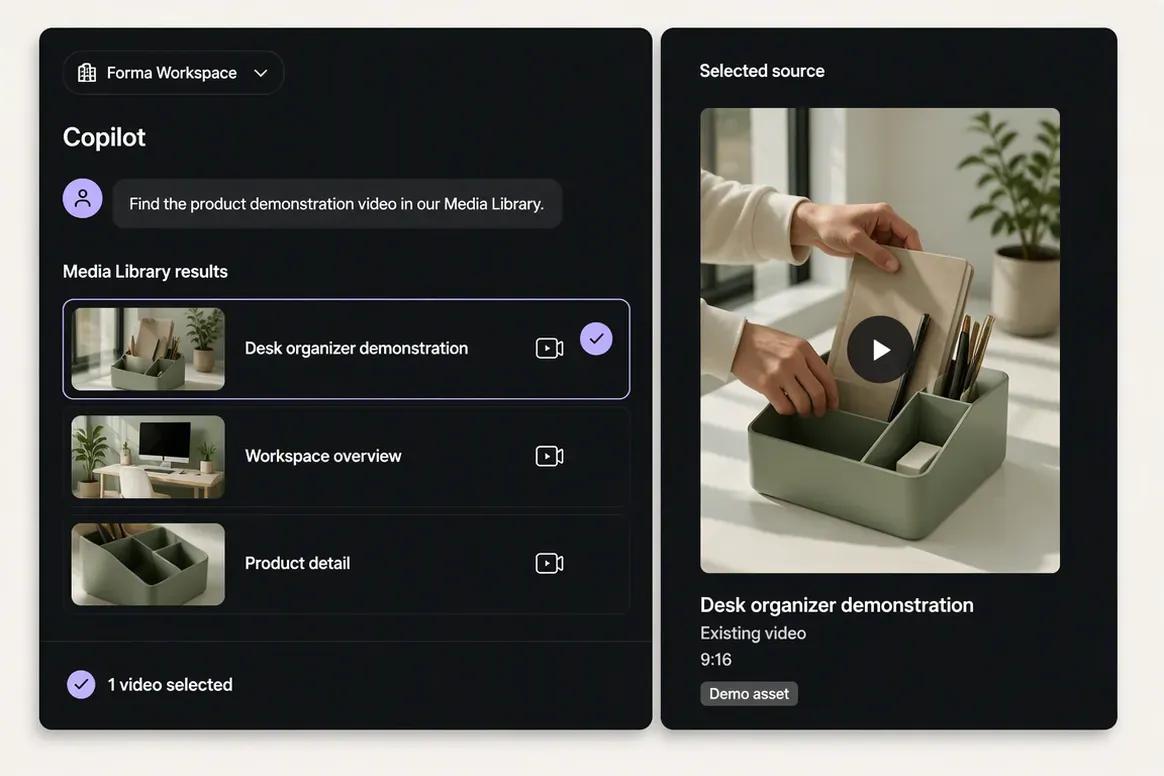
Media Library discovery
Step 1
Upload the finished source video or ask Copilot to locate it inside the selected brand's Media Library. Confirm that the correct asset has been selected before processing begins.
“Find the product demonstration video in our Media Library and show me the matching results.”
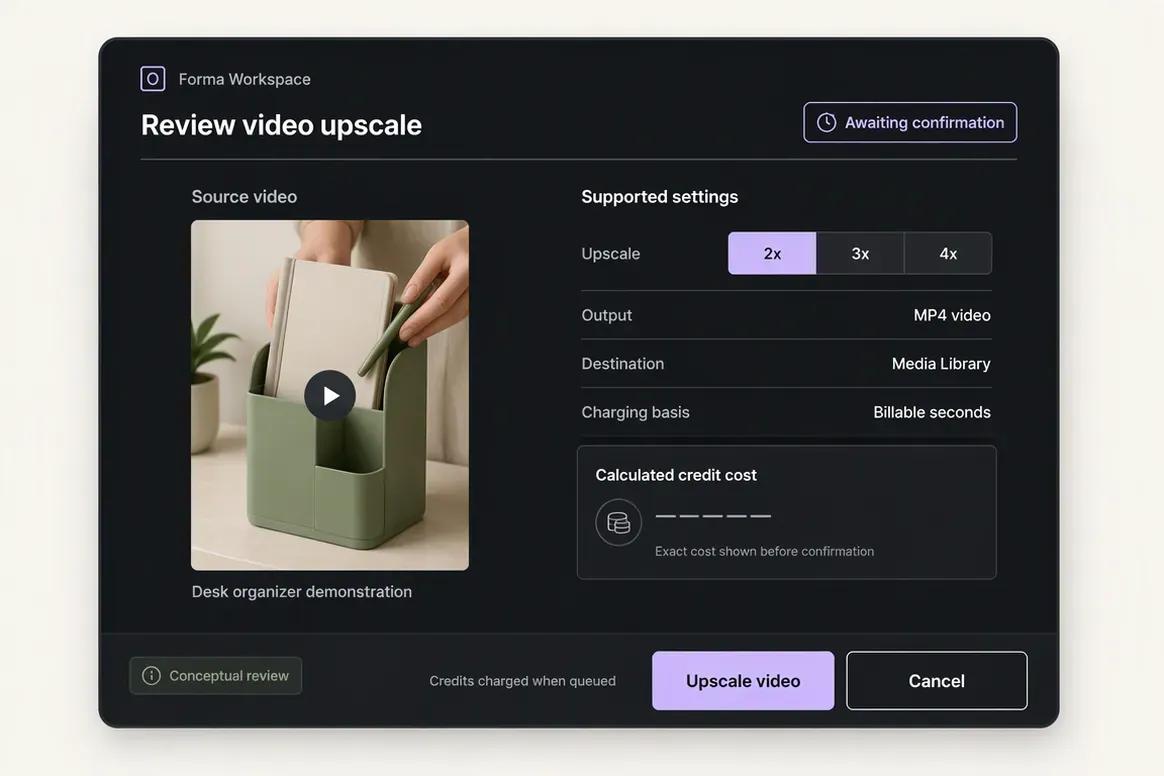
Step 2
Choose the processing operation required for the selected video. Copilot prepares the supported action and settings for review before the processing task is submitted.
“Prepare a video upscale for this asset. Show me the supported scale and expected action before running it.”
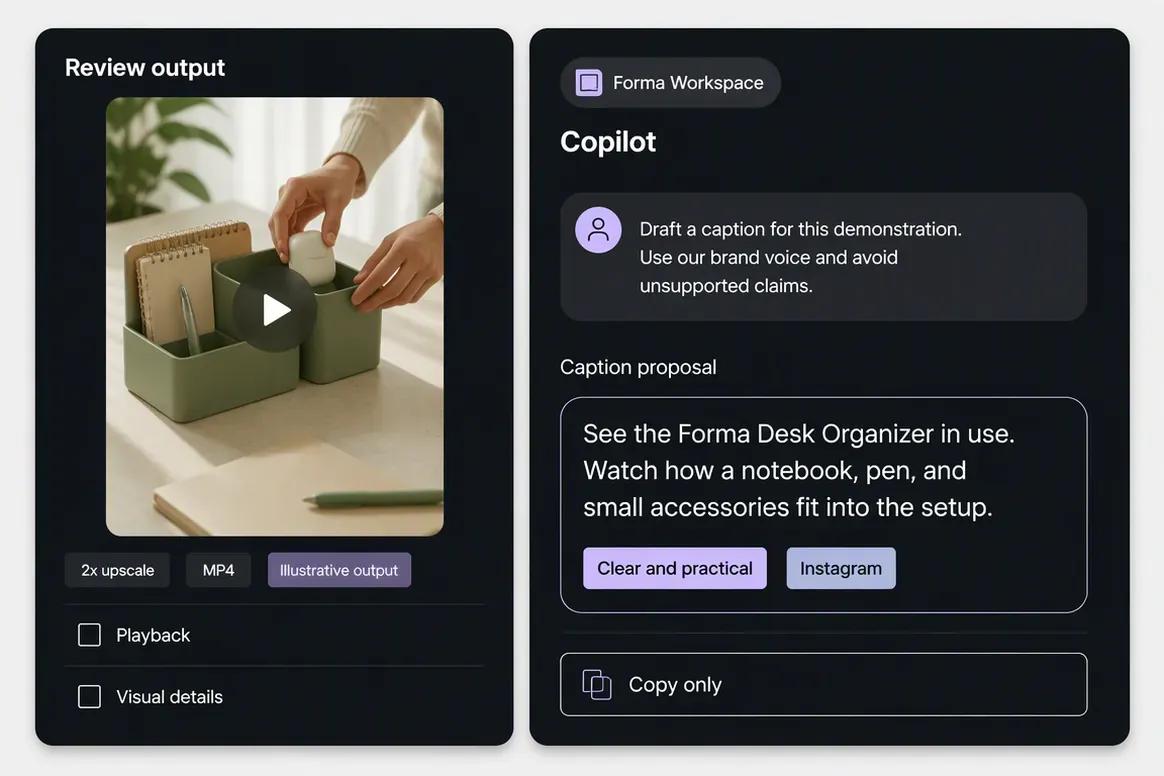
Step 3
Inspect the completed video and save the approved result to the Media Library. Ask Copilot to prepare supporting copy that accurately represents the content without introducing unsupported product claims.
“Draft a caption introducing this product demonstration. Use our brand voice and avoid unsupported product claims.”
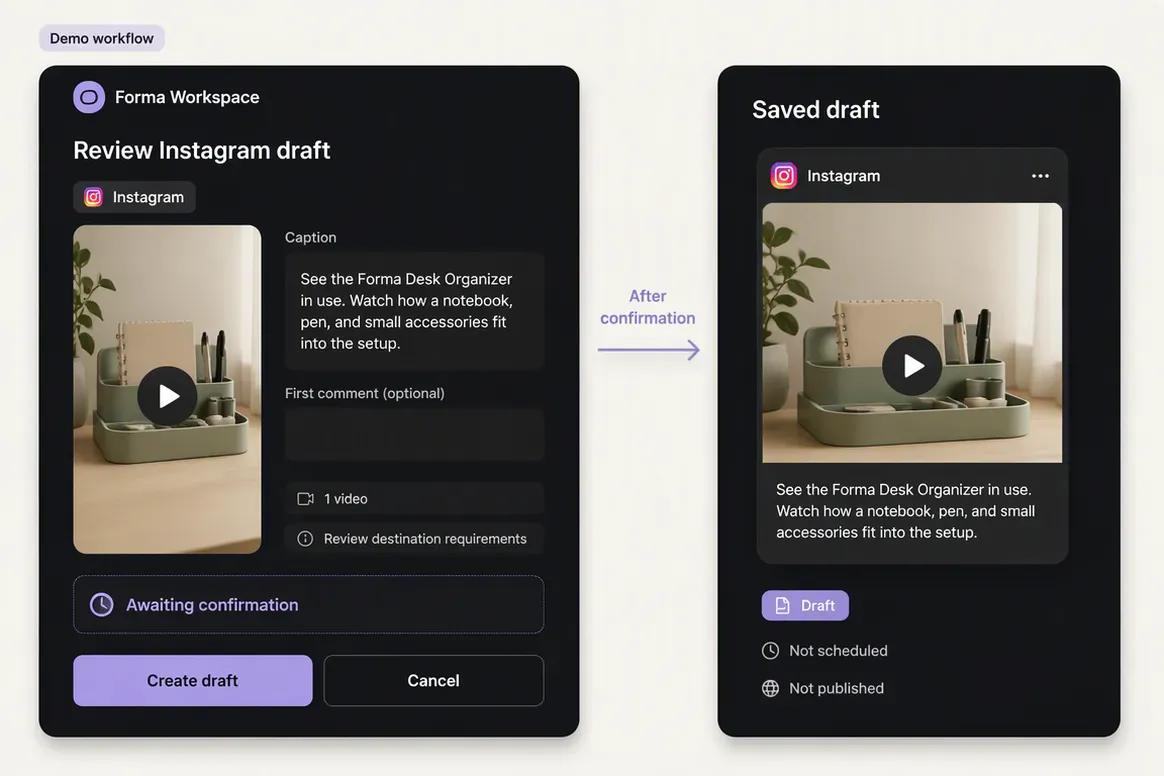
Step 4
Attach the approved video to a destination-specific draft. Check the caption, destination requirements, scheduling details, and publishing action before confirmation.
“Prepare an Instagram publishing draft using this processed video and caption. Show me the final details for review.”
Move from brand context to reviewable content and supported actions without rebuilding the same marketing context across disconnected tools.
Start With OolookWhy teams choose Oolook
Oolook connects structured brand context, coordinated creative production, media processing, controlled publishing, reporting, and search-content execution.
Oolook Copilot can work with available Brand Kit information, media, connected profiles, drafts, schedules, reports, search projects, and application history.
Oolook separates recommendations from workspace changes. Supported actions are prepared for confirmation so your team can inspect what will happen before execution.
Generate images with references, coordinated carousel cards, and visual direction inside the selected brand workspace.
Find an existing asset, then resize, reframe, upscale, remove its background, extract its palette, or adjust its colors without leaving the Media Library.
Continue into researched article generation, evaluation, editing, reevaluation, and optimization without rebuilding the brand context in another product.
Where CapCut is stronger
CapCut has clear advantages when timeline editing, effects, templates, motion tools, audio editing, mobile creation, and ecommerce video production are central requirements.
Workflow comparison
Oolook starts with structured brand context and connects multi-format assets to publishing and SEO. CapCut starts with source media or a template and provides detailed visual and audio editing.
Current pricing
Compare the brands, social profiles, posts, storage, AI credits, reporting, and support your team actually needs.
Loaded from Oolook's pricing API when this page opens.
Loading current Oolook plans…
Public pricing reviewed on October 2, 2026.
$0
Includes core mobile, desktop, and web editing with plan, platform, region, asset, watermark, resolution, storage, and AI restrictions. Confirm the exact current limits for your device and country.
Reviewed at about $19.99/month or $179.99/year
Includes premium templates, stock, effects, selected AI tools, background removal, upscaling, higher export options, Brand Kit capabilities, and reviewed cloud storage. Regional and app-store prices can differ.
Reviewed at about $15 to $30 per user monthly
Adds shared Spaces, cloud collaboration, team assets, project handoff, and seat management. Exact pricing, storage, and included credits require current checkout verification.
Separate subscription, reviewed from about $119.99/year
Separate ecommerce platform for product-URL-to-video, product imagery, AI avatars, batch ad creative, commerce templates, scheduling, and analytics. Current pricing and credits require direct verification.
Oolook plans scale through brand workspaces, profiles, posts, storage, AI credits, reports, and support. CapCut costs vary across Free, Pro, Teams, web AI credits, storage, app stores, regions, and the separate Pippit platform. Compare your editors, brands, AI generations, storage, commercial asset rights, publishing needs, ecommerce workflows, reports, and SEO requirements.
CapCut prices and limits can change after the research date. Oolook values are loaded from its pricing API. Currency conversions outside INR are approximate. Confirm taxes, promotions, add-ons, checkout currency, and final billing terms before purchasing.
Make the decision
CapCut earns its place when detailed video editing, templates, effects, audio, and motion tools matter. Oolook becomes more relevant when brand context, multi-format assets, social publishing, reporting, and SEO content must remain connected.
Questions before you choose
Straight answers to the practical questions buyers ask before choosing between Oolook and CapCut.
CapCut is a video and image editing ecosystem built around mobile, desktop, web, templates, effects, and AI creative tools. Oolook is a broader brand-aware marketing workspace connecting creative assets, media processing, social publishing, reporting, and SEO content.
Yes, for teams comparing AI creative production and marketing workflows. Oolook is not a complete replacement for CapCut's multi-track timeline editor, effects, templates, audio tools, or motion controls.
CapCut is the stronger fit when the primary requirement is timeline editing, keyframes, masks, effects, transitions, audio, color controls, tracking, and mobile-first video templates.
Pippit is the separate ByteDance ecommerce-creative platform that evolved from CapCut Commerce Pro. It focuses on product videos, images, AI avatars, batch creative, commerce workflows, scheduling, and analytics.
Yes, through eligible web and ecosystem tools. Availability, models, credits, duration, and regional access depend on the selected product and plan.
Paid and team workflows support selected logos, colors, fonts, reusable styles, and shared assets. Oolook connects a wider set of brand context to Copilot, publishing, reporting, and SEO workflows.
Standard CapCut is primarily an editor and export tool. More complete scheduling and commerce-publishing workflows are associated with Pippit. Verify current destination support before purchasing.
A comparable native workflow for keyword research, article generation, evaluation, editing, reevaluation, and optimization was not verified for CapCut.
The reviewed information indicates that subscription credits reset monthly and do not roll over, while purchased credits can have a longer validity period. Confirm the current rules in your region.
Commercial rights depend on the specific music, template, stock asset, plan, region, and licensing terms. Businesses should verify each asset and use commercial libraries where required.
CapCut is likely stronger when an agency primarily delivers edited video. Oolook is more relevant when each client needs separated brand context, multi-format creative assets, publishing, reports, and SEO workflows.
No one-click migration was verified. Teams would normally export finished videos and source assets, then upload relevant media into Oolook and recreate brand workspaces and publishing workflows.
Research and sources
This comparison uses established Oolook product information and available official CapCut product information. CapCut pricing, AI credits, Teams, Pippit, licensing, and regional feature availability should be rechecked before publication.
CapCut is a trademark of its respective owner. Oolook is not affiliated with or endorsed by CapCut. Product capabilities, plans, prices, limits, AI terms, integrations, and policies can change. Confirm current official information before purchasing. If you identify an inaccurate statement, contact Yogesh@oolook.in.
Build around the brand
Use Oolook to connect your Brand Kit, Copilot, creative tools, reusable Media Library, social publishing, reporting, and SEO content workflows.