Oolook vs Frase

Do You Need a Dedicated SEO and GEO Content System or a Broader Marketing Workspace?

Frase connects SERP research, briefs, AI writing, SEO and GEO scoring, GSC opportunities, site auditing, AI visibility, and CMS publishing. Oolook connects SEO content with structured Brand Kits, creative production, reusable media, social publishing, reporting, and controlled execution.

Comparison researched and reviewed on October 1, 2026

The short answer

Choose Based on Whether Search Optimization or Connected Marketing Is the Main Job

Frase is built for a focused SEO and GEO content loop. Oolook connects search content to a broader brand, creative, media, social, and reporting operation.

Choose Oolook for multi-brand creative, social, and SEO execution

Oolook is the stronger fit when SEO content must share context with Brand Kits, multi-brand workspaces, visual generation, media processing, social publishing, reports, and confirmation-based Copilot actions.

Choose Frase for SERP-native SEO, GEO, and AI visibility

Frase is the stronger fit when SERP research, automated briefs, dual SEO and GEO scoring, GSC opportunities, Content Guard, site auditing, AI-search tracking, CMS publishing, or API-driven content workflows are central requirements.

Feature comparison

Oolook vs Frase at a Glance

Compare what each product contributes to search research, article production, optimization, AI visibility, brand context, creative work, social execution, collaboration, and cost.

Decision areaOolookFrase
Best suited toMulti-brand marketing teams that want SEO connected to Brand Kits, creative assets, media, social publishing, and reporting.Writers, SEO teams, agencies, and enterprises focused on SERP research, SEO and GEO optimization, AI citations, content refreshes, and CMS publishing.
Operating modelUses separate brand workspaces containing Brand Kit context, media, profiles, posts, reports, and SEO projects.Uses Sites, documents, folders, research projects, Rank-Ready documents, opportunities, audits, Content Guard, and AI Visibility projects.
Brand contextA structured Brand Kit guides supported SEO, social, visual, media, and Copilot workflows.Brand Voice, Reference Documents, Terms, Style Guides, and custom instructions guide research and AI output.
Multi-site managementBrand workspaces separate marketing operations by brand.Reviewed plans support one Site on Starter, five on Professional, ten on Scale, and custom limits on Enterprise.
AI agentCopilot can inspect available workspace information and prepare supported actions for confirmation.Frase Agent can research, brief, write, optimize, audit, and publish with user approval and plan-based limits.
SERP researchSupports competitor research within its documented SEO article workflow.Analyzes competitor pages, headings, word counts, topics, terms, questions, intent, and SERP patterns.
Content briefsSupports researched article briefs and structured article preparation.Provides automated briefs, outline generation, competitor headings, questions, topics, links, keywords, custom sections, templates, and exports.
Article generationSupports AI article generation using brand and research context.AI Writer, Rank-Ready workflows, and Frase Agent produce outlines, sections, rewrites, summaries, and full research-grounded articles.
SEO scoringSupports article evaluation, editing, reevaluation, and optimization.Provides real-time SEO scoring, topic recommendations, terms, entities, structure, word-count guidance, links, and competitor comparisons.
GEO scoringAI-search optimization should only be claimed where currently verified.Provides GEO scoring and recommendations designed to improve content citability across supported AI-search experiences.
Existing-content optimizationSupports existing-page evaluation and optimization in its SEO workflow.Imports URLs or existing content for refresh, optimization, scoring, recommendations, and approved updates.
Content opportunitiesSupports competitor and search-content research inside brand projects.Uses Google Search Console data for prioritized opportunities, clicks, impressions, positions, gaps, decay, and potential impact.
Content GuardContent monitoring outside the established article workflow depends on current product scope.Content Guard monitors eligible pages for decay and proposes fixes or republishing actions under user control.
Topic clustersTopical planning beyond the established article workflow depends on current product scope.Provides topic clusters, content gaps, competitor gaps, programmatic patterns, inventory, and editorial planning.
Internal linkingUses sitemap and internal-link context within supported SEO workflows.Provides internal-link suggestions and site-structure analysis, with deeper availability on higher plans.
Technical SEOA complete technical crawler is not assumed.Provides a site auditor for selected metadata, canonicals, headings, broken links, structured data, content quality, and internal structure.
Rank tracking and backlinksTraditional rank tracking and backlink databases are outside the established scope.A complete traditional rank tracker and deep specialist backlink database were not verified as primary strengths.
AI-search visibilityDedicated AI-search tracking should only be claimed where currently verified.AI Visibility tracks prompts, mentions, citations, referenced URLs, competitors, share of voice, and supported AI engines.
CMS publishingSupports content creation and optimization inside the Oolook workspace.Publishes to WordPress, Webflow, Sanity, Wix, FraseCMS, and other eligible integrations.
Creative generationProvides captions, AI images, coordinated carousels, moodboards, and media-processing applications.Provides limited article images and visual assets, but not a comparable creative and social production suite.
Social publishingSupports drafts, scheduling, publishing, validation, statuses, retries, and connected reports.Native social scheduling, publishing, Inbox, and social analytics were not verified as core features.
CollaborationSupports brand workspaces and plan-dependent collaboration and feedback.Provides seats, roles, assignments, document status, deadlines, sharing, exports, client reports, and Enterprise white-label options.
API and integrationsConnects supported brand, social, media, and marketing workflows.Provides GSC, Google Docs, WordPress, Webflow, Sanity, Wix, Slack, API, MCP, CLI, webhooks, exports, and FraseCMS.
Free accessOffers an available Free plan, with current limits loaded from the pricing API.Does not offer a permanent Free plan. A reviewed seven-day trial is available without a credit card.
Pricing basisPlans scale through brand workspaces, profiles, posts, storage, AI credits, reports, and support.Plans scale through Sites, users, articles, audit pages, AI generations, Content Guard pages, AI Visibility prompts, and integrations.

Product names, plans, prices, network APIs, AI limits, add-ons, and commercial terms can change. Confirm purchase-critical requirements on each vendor's current official pages.

Oolook Copilot in action

Move From an SEO Topic to an Evaluated Article

Connect the article objective, available research context, generation, evaluation, revision, and supporting social distribution. See how this connected Oolook workflow relates to teams evaluating Frase.

Oolook Copilot

SEO article workflow

Working in: Alder & Form
Ask anything
This demonstration does not show live ranking data. Article output and evaluation depend on the supplied project context.
Prepare the research and article workflowEvaluate and revise the articlePrepare the final article and distribution
  1. 1

    Step 1

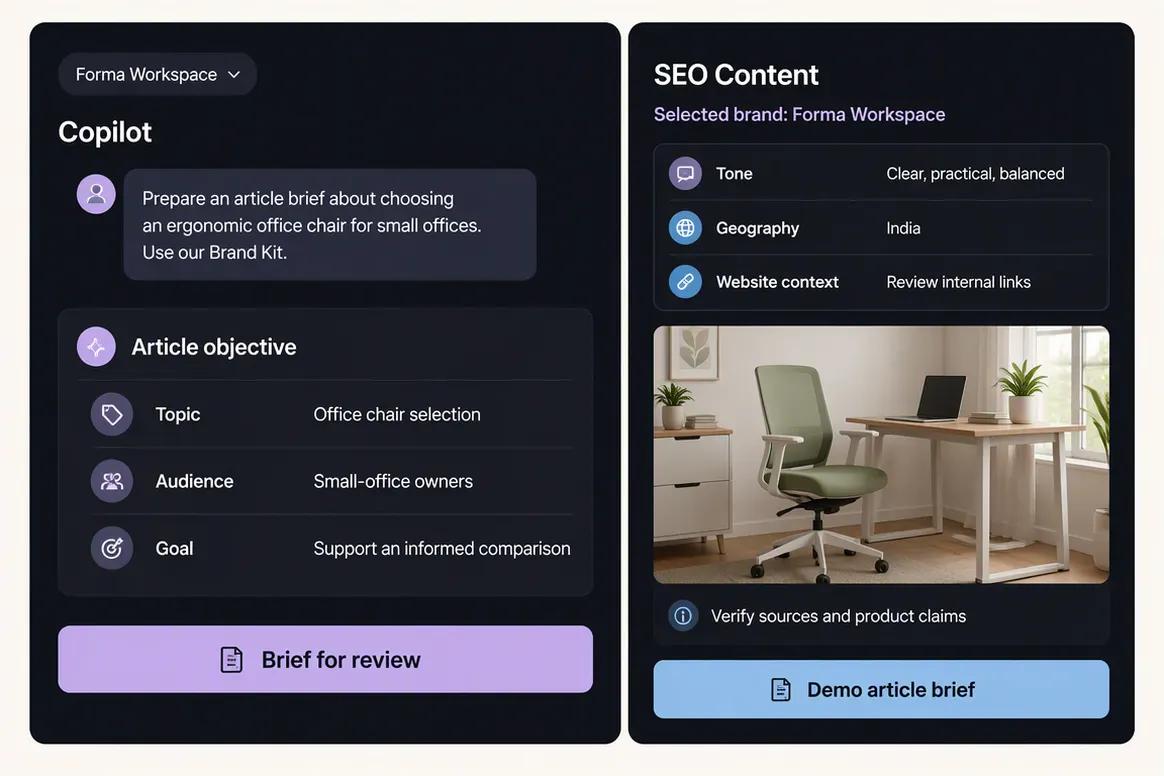
    Define the article objective with Copilot

    Provide the topic, audience, geography, business objective, and relevant website context. Copilot can organize the request and identify the information required before the SEO workflow begins.

    Ask Oolook Copilot
    “Help me prepare an SEO article about choosing an ergonomic office chair for small offices. Use our Brand Kit and available SEO project context.”
    Oolook Copilot defining an SEO article objective
  2. 2

    Step 2

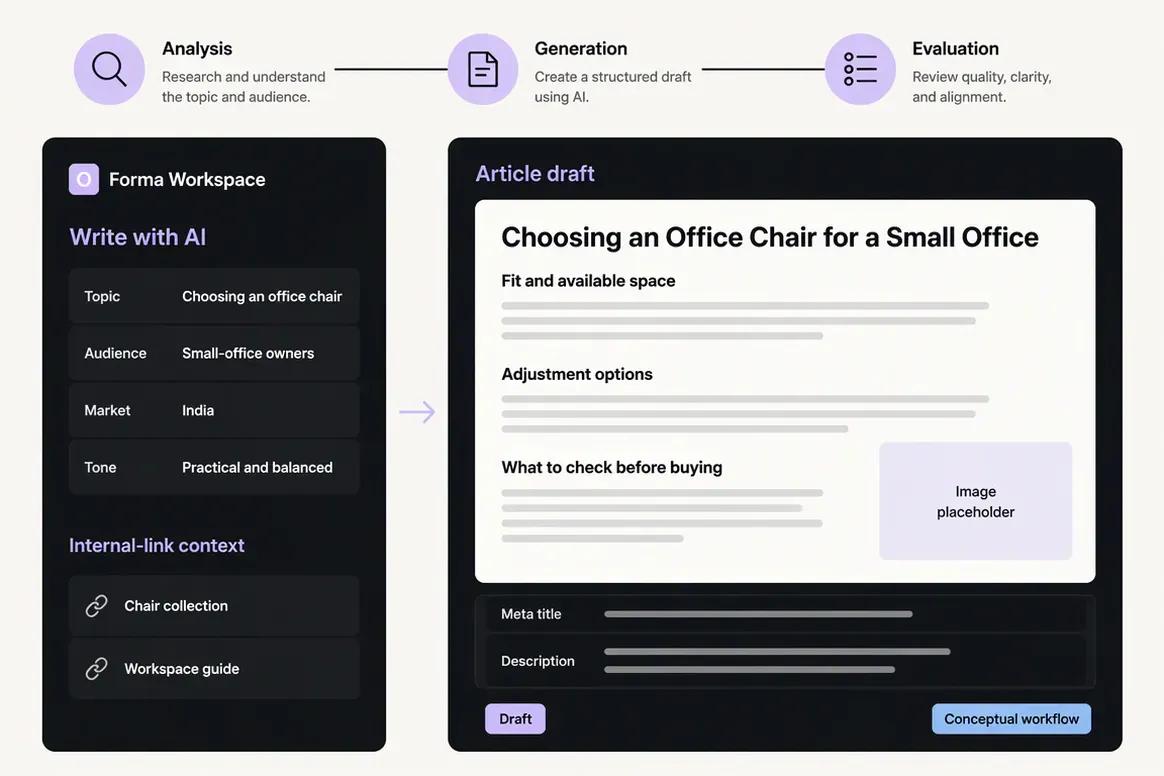
    Prepare the research and article workflow

    Continue into the supported SEO workflow using the approved topic and audience. Add relevant website, competitor, keyword, and internal-link context where it is available.

    Ask Oolook Copilot
    “Prepare the article workflow using this topic, audience, business objective, and available internal-link context.”
    Oolook SEO research and article generation workflow
  3. 3

    Step 3

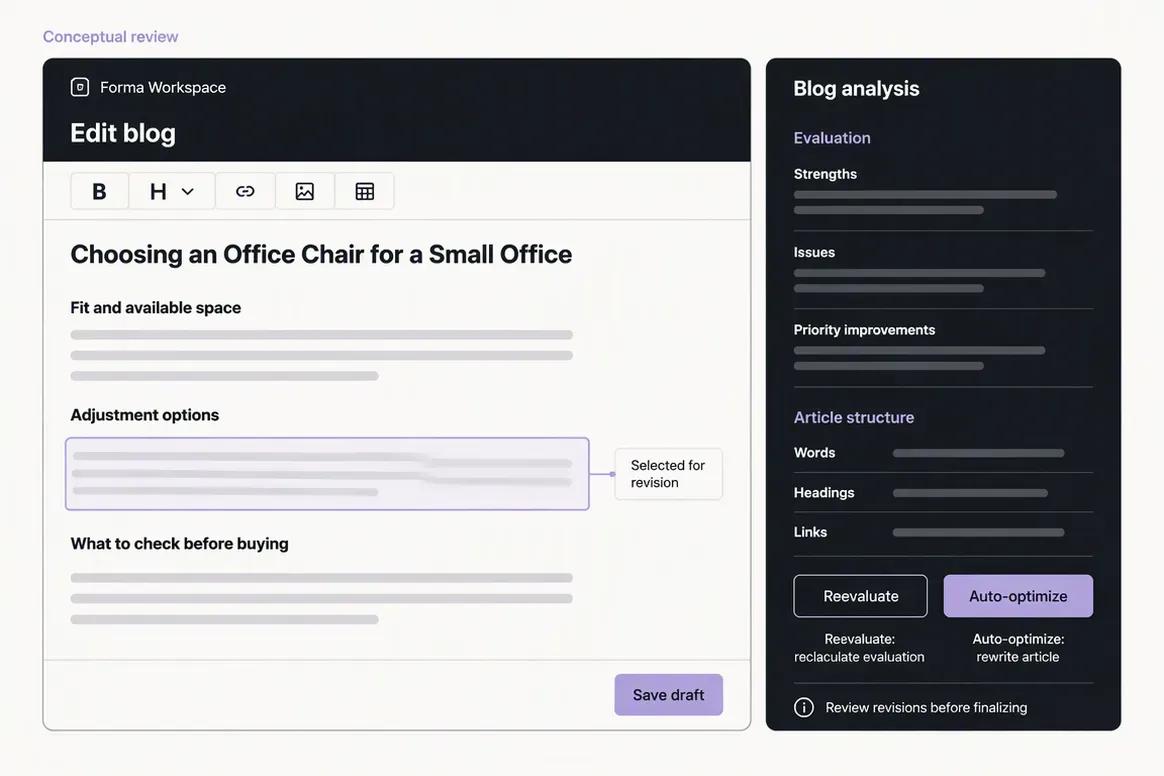
    Evaluate and revise the article

    Review the generated draft and its available evaluation results. Identify weak sections, edit the content, verify important factual claims, and run reevaluation after the revisions are complete.

    Ask Oolook Copilot
    “Review the available article evaluation and identify the sections that need revision before reevaluation.”
    Oolook article editor displaying SEO evaluation results
  4. 4

    Step 4

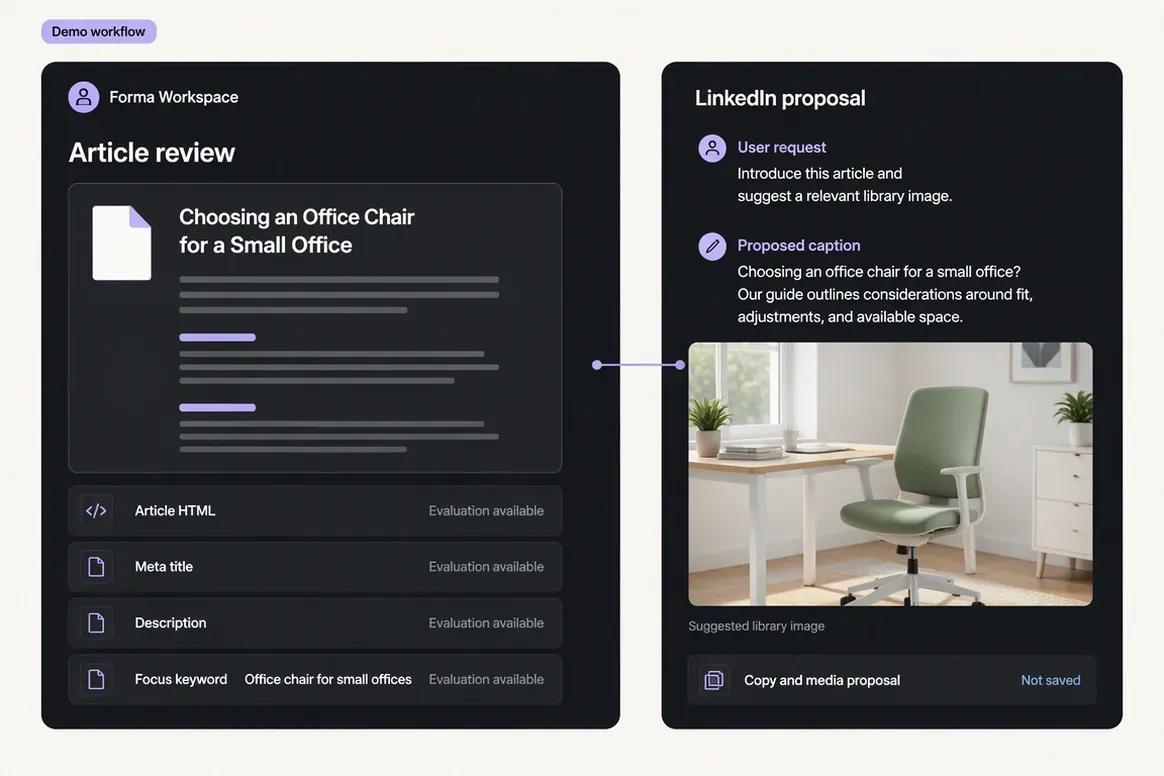
    Prepare the final article and distribution

    Review the final article output and metadata. Ask Copilot to prepare supporting social content and select a relevant Media Library asset so the completed article can be distributed through the appropriate workflow.

    Ask Oolook Copilot
    “Draft a LinkedIn post introducing this article and suggest a relevant image from our Media Library.”
    Oolook final SEO article with a supporting LinkedIn draft

Keep the Work Connected With Oolook Copilot

Move from brand context to reviewable content and supported actions without rebuilding the same marketing context across disconnected tools.

Start With Oolook

Why teams choose Oolook

Connect Creative Production to the Full Brand Workflow

Oolook connects structured brand context, coordinated creative production, media processing, controlled publishing, reporting, and search-content execution.

Give Copilot structured workspace context

Oolook Copilot can work with available Brand Kit information, media, connected profiles, drafts, schedules, reports, search projects, and application history.

Review supported actions before execution

Oolook separates recommendations from workspace changes. Supported actions are prepared for confirmation so your team can inspect what will happen before execution.

Create coordinated brand assets

Generate images with references, coordinated carousel cards, and visual direction inside the selected brand workspace.

Process and reuse existing media

Find an existing asset, then resize, reframe, upscale, remove its background, extract its palette, or adjust its colors without leaving the Media Library.

Connect social execution with SEO content

Continue into researched article generation, evaluation, editing, reevaluation, and optimization without rebuilding the brand context in another product.

Where Frase is stronger

Frase Is Built for SERP Research, SEO and GEO Scoring, and AI Visibility

Frase has clear advantages when SERP research, automated briefs, dual SEO and GEO scoring, GSC-based opportunities, content monitoring, AI citations, and CMS publishing are central requirements.

SERP research covering competitors, headings, word counts, questions, topics, terms, and intent.
Automated research briefs, outlines, templates, custom sections, and exports.
Real-time SEO and GEO scoring inside the same content editor.
Frase Agent for research, briefing, writing, optimization, auditing, and publishing under user control.
Brand Voice, Reference Documents, Terms, and Style Guides.
GSC-powered Content Opportunities, gaps, positions, decay, and prioritization.
Content Guard for monitoring and approved refresh workflows.
AI Visibility for prompts, mentions, citations, referenced URLs, competitors, and share of voice.
Site auditing and internal-link recommendations.
WordPress, Webflow, Sanity, Wix, FraseCMS, API, MCP, CLI, webhooks, and export integrations.

Workflow comparison

Two Different Ways to Turn Research Into Published Content

Oolook starts with a brand workspace and connects SEO work to creative and social execution. Frase starts with a Site, SERP research, briefs, AI writing, SEO and GEO scores, opportunities, and CMS publishing.

With Oolook

  1. 1Create a dedicated workspace for the brand.
  2. 2Configure structured Brand Kit information.
  3. 3Connect supported profiles and organize reusable media.
  4. 4Ask Copilot to inspect workspace information or prepare content.
  5. 5Generate captions, images, carousels, or visual direction.
  6. 6Process existing media when new generation is unnecessary.
  7. 7Review captions, media, and supported settings by destination.
  8. 8Confirm supported actions and monitor publication status.
  9. 9Review reports or continue into an SEO article workflow.

With Frase

  1. 1Create a Site for the website or client.
  2. 2Connect Google Search Console where performance data is required.
  3. 3Configure Brand Voice, Reference Documents, Terms, and style guidance.
  4. 4Create a research project or Rank-Ready document.
  5. 5Review SERP competitors, questions, headings, terms, and intent.
  6. 6Generate or edit the brief and article outline.
  7. 7Write or generate content while monitoring SEO and GEO scores.
  8. 8Publish through a connected CMS or FraseCMS.
  9. 9Monitor opportunities, decay, site health, and AI visibility.

Current pricing

Compare Plans Against Your Real Monthly Workload

Compare the brands, social profiles, posts, storage, AI credits, reporting, and support your team actually needs.

Current Oolook plans

Loaded from Oolook's pricing API when this page opens.

Open the standard pricing page

Loading current Oolook plans…

Frase plans

Public pricing reviewed on October 1, 2026.

Check current Frase pricing

Frase Starter

$49/month or $39/month when billed annually

Includes 1 user, 1 Site, 10 articles monthly, 50 audit pages, 25 AI generations, 10 Content Guard pages, 50 AI Visibility prompts, one Brand Voice, and core GSC and integration access. Annual total is $468.

Frase Professional

$129/month or $103/month when billed annually

Includes 3 users, 5 Sites, 40 articles monthly, 250 audit pages, 100 AI generations, 75 Content Guard pages, 200 AI Visibility prompts, five Brand Voices, and broader workflow features. Annual total is $1,236.

Frase Scale

$299/month or $239/month when billed annually

Includes 5 users, 10 Sites, 100 articles monthly, 1,000 audit pages, 350 AI generations, 300 Content Guard pages, 500 AI Visibility prompts, unlimited reviewed Brand Voices, and client-ready reporting. Annual total is $2,868.

Frase Enterprise

Custom pricing

Sales-led plan for custom users, Sites, articles, audits, AI usage, visibility prompts, security, SSO, white-label reports, support, onboarding, and commercial terms.

Do not compare price without comparing usage

Oolook plans scale through brand workspaces, social profiles, posts, storage, AI credits, reports, and support. Frase plans scale through Sites, users, articles, audit pages, AI generations, Content Guard pages, AI Visibility prompts, CMS workflows, and API usage. Compare your article volume, websites, users, optimization needs, AI prompts, creative workload, social publishing, and media requirements.

Frase prices and limits can change after the research date. Oolook values are loaded from its pricing API. Currency conversions outside INR are approximate. Confirm taxes, promotions, add-ons, checkout currency, and final billing terms before purchasing.

Make the decision

Do Not Buy a Dedicated SEO System for a Broader Marketing Problem

Frase earns its place when SERP research, SEO and GEO scoring, GSC opportunities, Content Guard, CMS publishing, and AI visibility matter most. Oolook becomes more relevant when SEO must remain connected to structured brand context, creative production, media, social publishing, and reporting.

Oolook is likely the better fit if:

  • You need explicit multi-brand workspaces and Brand Kits.
  • You manage social publishing alongside SEO production.
  • You need AI images, coordinated carousels, and moodboards.
  • You regularly process and reuse brand media assets.
  • You want Copilot to inspect broader workspace information.
  • You want supported marketing actions presented for confirmation.
  • You prefer one workspace across creative, social, reporting, and SEO work.

Frase is likely the better fit if:

  • SERP research and automated briefs are primary requirements.
  • You need dual SEO and GEO scoring.
  • GSC-powered content opportunities and decay monitoring matter.
  • You need AI-search prompt, mention, and citation tracking.
  • CMS publishing is part of your content workflow.
  • You need API, MCP, CLI, webhooks, or programmatic exports.
  • Social publishing and creative production are handled elsewhere.

Questions before you choose

Oolook vs Frase FAQs

Straight answers to the practical questions buyers ask before choosing between Oolook and Frase.

What is the main difference between Oolook and Frase?+

Frase is a dedicated SEO and GEO content operating system built around SERP research, briefs, AI writing, scoring, GSC opportunities, site auditing, CMS publishing, and AI visibility. Oolook connects SEO content with Brand Kits, creative generation, media processing, social publishing, reporting, and broader marketing execution.

Is Oolook a Frase alternative?+

Yes, for teams comparing competitor research, briefs, AI articles, content scoring, editing, and optimization. Frase provides deeper dedicated SERP, GEO, opportunity, and AI-visibility workflows, while Oolook covers more creative, media, brand, and social jobs.

Does Frase provide SEO and GEO scoring?+

Yes. Frase provides real-time SEO and GEO scoring and recommendations designed for traditional search performance and AI-search citability.

Does Frase track AI-search visibility?+

Yes. AI Visibility tracks supported prompts, mentions, citations, referenced URLs, competitors, share of voice, and AI engines, subject to plan limits.

Does Frase have a permanent free plan?+

No permanent Free plan was identified. Frase offers a reviewed seven-day trial without a credit card.

How many articles can Frase create each month?+

Reviewed monthly allowances are 10 articles on Starter, 40 on Professional, and 100 on Scale. Enterprise limits are custom.

Can Frase optimize existing content?+

Yes. Frase can import existing content or URLs, compare coverage against SERP data, update SEO and GEO scores, and support refresh workflows.

Does Frase provide social publishing?+

A complete native social scheduling, publishing, Inbox, and analytics suite was not verified. Frase focuses on SEO, GEO, content production, site monitoring, and CMS publishing.

Which product has stronger creative tools?+

Oolook is the stronger fit when AI images, coordinated carousels, moodboards, Media Library operations, background removal, upscaling, palette extraction, color grading, or video processing are required.

Which product is better for pure SEO and GEO?+

Frase is likely the stronger fit when SERP research, automated briefs, dual SEO and GEO scoring, GSC opportunities, Content Guard, site auditing, and AI visibility are the primary requirements.

Which product is better for agencies?+

Frase is likely stronger for agencies focused on multi-site SEO production, optimization, client reports, CMS publishing, and AI visibility. Oolook is likely stronger when each client also needs Brand Kits, creative assets, media processing, social publishing, and reporting.

Can I migrate automatically from Frase to Oolook?+

No one-click migration was verified. Export documents and reports, recreate brand context and projects, reconnect integrations, and retain copies of optimization and AI Visibility data where exports are available.

Research and sources

Check the Details That Matter to Your Purchase

This comparison uses established Oolook product information and official Frase product, pricing, feature, documentation, Help Center, integration, and AI-search sources.

Frase is a trademark of its respective owner. Oolook is not affiliated with or endorsed by Frase. Product capabilities, plans, prices, limits, AI terms, integrations, and policies can change. Confirm current official information before purchasing. If you identify an inaccurate statement, contact Yogesh@oolook.in.

Build around the brand

Connect Brand Context, Creative Production, Media, and Execution

Use Oolook to connect your Brand Kit, Copilot, creative tools, reusable Media Library, social publishing, reporting, and SEO content workflows.