Choose Oolook for connected brand and marketing execution
Oolook is the stronger fit when content must move from brand context to captions, carousels, media processing, destination-specific publishing, reporting, and SEO execution.
Solutions
Solutions OverviewMarketing AgenciesSmall BusinessesSocial Media ManagersMarketing TeamsContent CreatorsMulti-Brand MarketingBy Outcome
Social Media CampaignsSeasonal MarketingProduct Launch ContentEvent PromotionBrand-Consistent ContentContent RepurposingCross-Platform ContentMarketing Asset ReuseProduct EducationEducational ContentCustomer Story ContentSEO Blog ProductionBlog Content RefreshContent Performance ReviewPricingResourcesKling AI focuses on specialist video and image generation, motion control, camera direction, lip sync, and cinematic production. Oolook connects brand context, creative assets, media processing, social publishing, reporting, and SEO content.
Comparison researched and reviewed on October 1, 2026
The short answer
Kling AI is built to generate and direct media. Oolook is built to connect creative assets with Brand Kits, captions, publishing, reporting, and search-content workflows.
Oolook is the stronger fit when content must move from brand context to captions, carousels, media processing, destination-specific publishing, reporting, and SEO execution.
Kling AI is the stronger fit when text-to-video, image-to-video, motion control, camera direction, lip sync, multi-shot scenes, and high-resolution media generation are central requirements.
Feature comparison
Compare how each product handles video generation, image creation, brand context, media operations, publishing, analytics, SEO, API workflows, and cost.
| Decision area | Oolook | Kling AI |
|---|---|---|
| Best suited to | Marketing teams that need brand-aware creative production connected to publishing, reporting, media processing, and SEO content. | Filmmakers, agencies, advertisers, editors, creators, and developers focused primarily on cinematic video and image generation. |
| Primary workflow | Moves from Brand Kit context to creative assets, captions, social publishing, reports, and SEO execution. | Moves from prompts, images, motion references, or scripts to generated video, editing, download, or API delivery. |
| Text-to-video | Unrestricted specialist text-to-video generation is not positioned as an established Oolook advantage. | Provides specialist text-to-video generation through current Kling video models. |
| Image-to-video | Provides established image and video-processing tools inside marketing workflows. | Provides image-to-video generation with motion, scene, and reference controls. |
| Motion control | Advanced cinematic motion direction is outside the established comparison scope. | Provides motion controls for directing subjects and localized movement. |
| Camera control | Cinematic camera direction is outside the established Oolook scope. | Supports camera movement controls such as pan, tilt, zoom, roll, and directional movement. |
| Start and end frames | Start-and-end-frame cinematic generation is outside the established scope. | Supports workflows that guide generation between selected starting and ending frames. |
| Character consistency | Reference images can guide established image-generation workflows. | Uses reference images and motion controls to improve subject, style, and character consistency across generated video. |
| Lip sync | Lip-sync workflows exist elsewhere in the Oolook site, but are not used as an established comparison-page advantage here. | Provides lip-sync workflows for supported human and illustrated characters. |
| Audio | Audio generation is not positioned as an established advantage on this page. | Provides selected text-to-speech, voice, lip-sync, and native-audio capabilities, subject to current model and regional availability. |
| AI image generation | Supports prompts, references, aspect ratios, model choices, resolutions, and multiple image outputs. | Provides text-to-image and image-to-image generation through current image models. |
| High-resolution output | Supports high-resolution image generation and established upscaling workflows. | Provides paid access to higher-resolution video and image outputs, with credit costs depending on model and settings. |
| Brand context | A structured Brand Kit guides supported Copilot, social, visual, media, and SEO workflows. | Prompts and reference images can guide consistency, but a structured Brand Kit for voice, fonts, colors, audiences, and publishing was not verified. |
| Multi-brand management | Uses separate workspaces for each brand, including context, media, profiles, posts, reports, and search projects. | A comparable multi-brand marketing workspace system was not verified. |
| AI assistant | Copilot can inspect workspace information and prepare supported actions for confirmation. | Canvas includes assistance for ideas, scripts, storyboards, and generation, but a comparable marketing-workspace Copilot was not verified. |
| Carousel generation | Generates coordinated carousel cards using brand, topic, website, platform, and reference context. | A coordinated social-carousel generation workflow was not verified. |
| Media processing | Includes background removal, resizing, reframing, palette extraction, color grading, and image or video upscaling. | Provides specialist generation and selected editing controls. A comparable complete marketing-media processing suite was not verified. |
| Asset organization | Media Library stores uploads, generated outputs, processed assets, documents, images, and videos by brand. | Provides generation history, projects, Canvas, uploads, and outputs. Deep brand-specific asset organization was not verified. |
| Caption generation | Generates captions and variants using supported brand and destination context. | Dedicated destination-specific social-caption generation was not verified. |
| Social publishing | Supports drafts, immediate publishing, scheduling, platform validation, queues, retries, and status monitoring. | Native social scheduling, publishing, validation, and publishing-status monitoring were not verified. |
| Social analytics | Provides available profile and post metrics from supported connected networks. | Connected social-profile and post analytics were not verified. |
| SEO content workflow | Supports researched article generation, evaluation, editing, reevaluation, and optimization. | A comparable SEO article research and optimization workflow was not verified. |
| API | Public generative API access is not positioned as an Oolook advantage here. | Provides a separate developer platform for supported video, image, effect, and asynchronous generation workflows. |
| Free access | Offers an available Free plan, with current limits loaded from the pricing API. | Offers a permanent Free tier with limited creation capacity, watermarked outputs, and restricted commercial use under reviewed terms. |
| Pricing basis | Plans scale through workspaces, profiles, posts, storage, AI credits, reports, and support. | Plans scale through generation credits, models, resolution, duration, watermark removal, priority, and generation capacity. |
Product names, plans, prices, network APIs, AI limits, add-ons, and commercial terms can change. Confirm purchase-critical requirements on each vendor's current official pages.
Find existing media, run supported processing, prepare accompanying copy, and connect the result to social execution. See how this connected Oolook workflow relates to teams evaluating Kling AI.
Oolook Copilot
Media Library discovery
Step 1
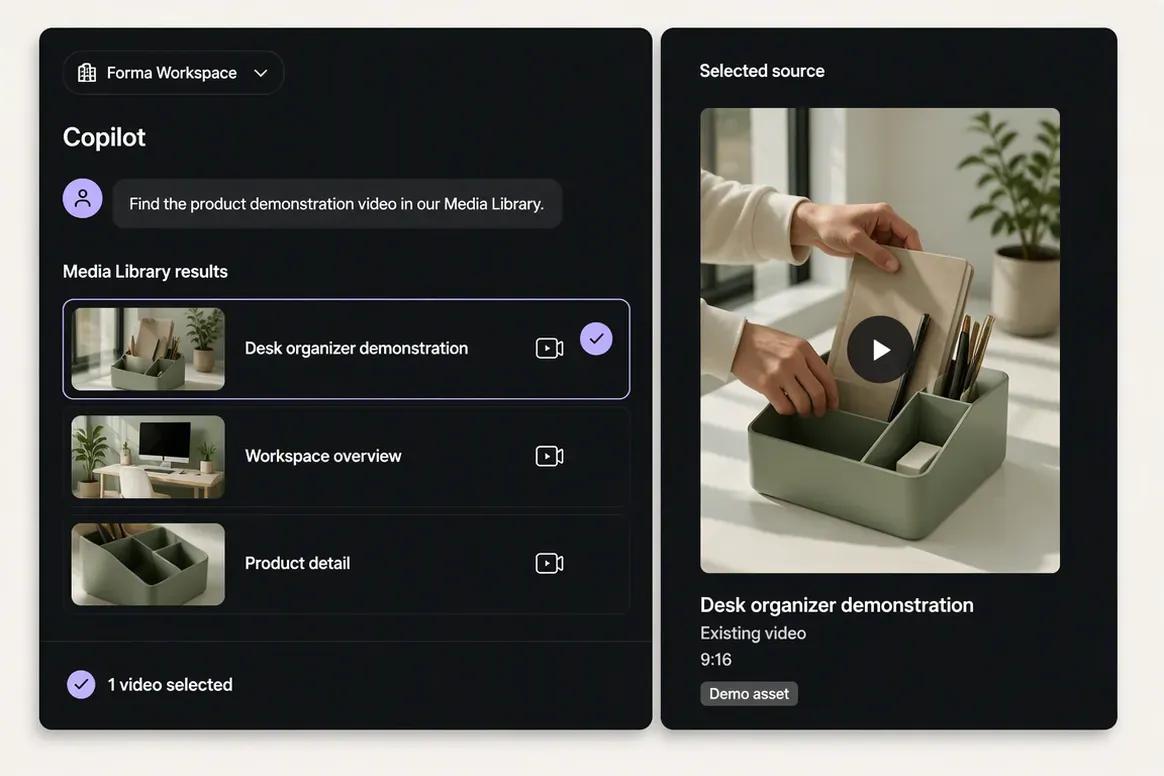
Upload the finished source video or ask Copilot to locate it inside the selected brand's Media Library. Confirm that the correct asset has been selected before processing begins.
“Find the product demonstration video in our Media Library and show me the matching results.”
Step 2
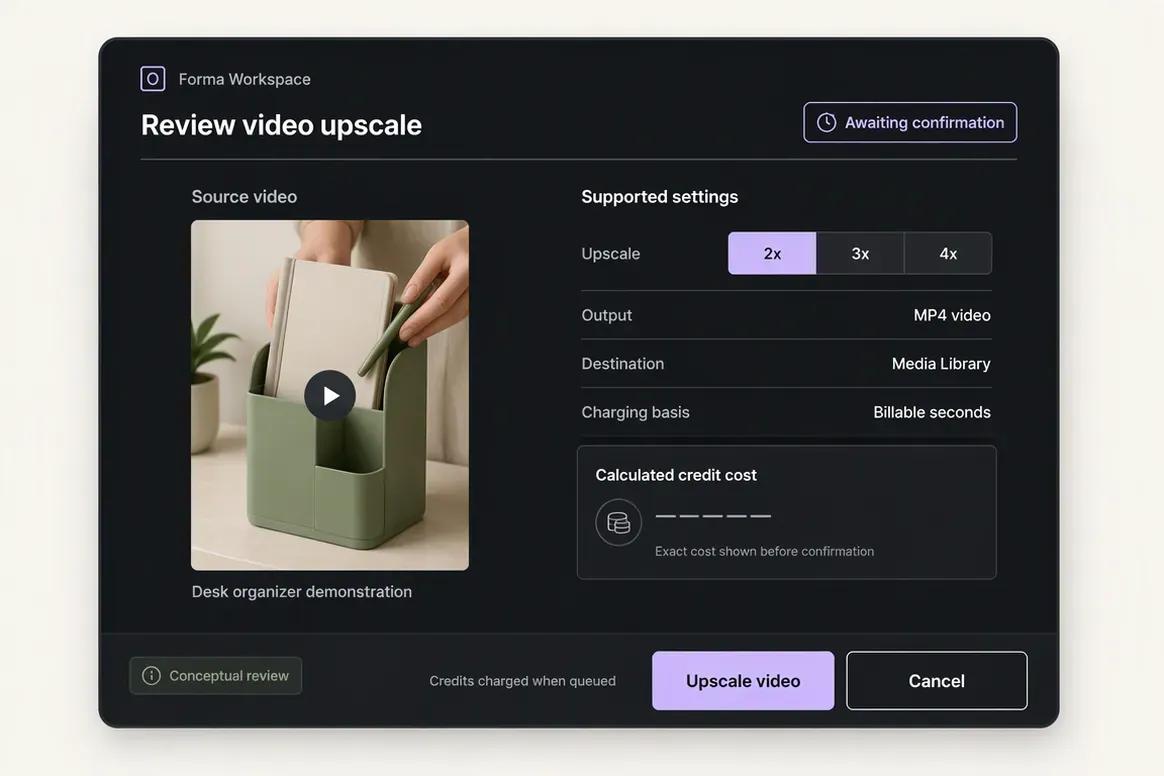
Choose the processing operation required for the selected video. Copilot prepares the supported action and settings for review before the processing task is submitted.
“Prepare a video upscale for this asset. Show me the supported scale and expected action before running it.”
Step 3
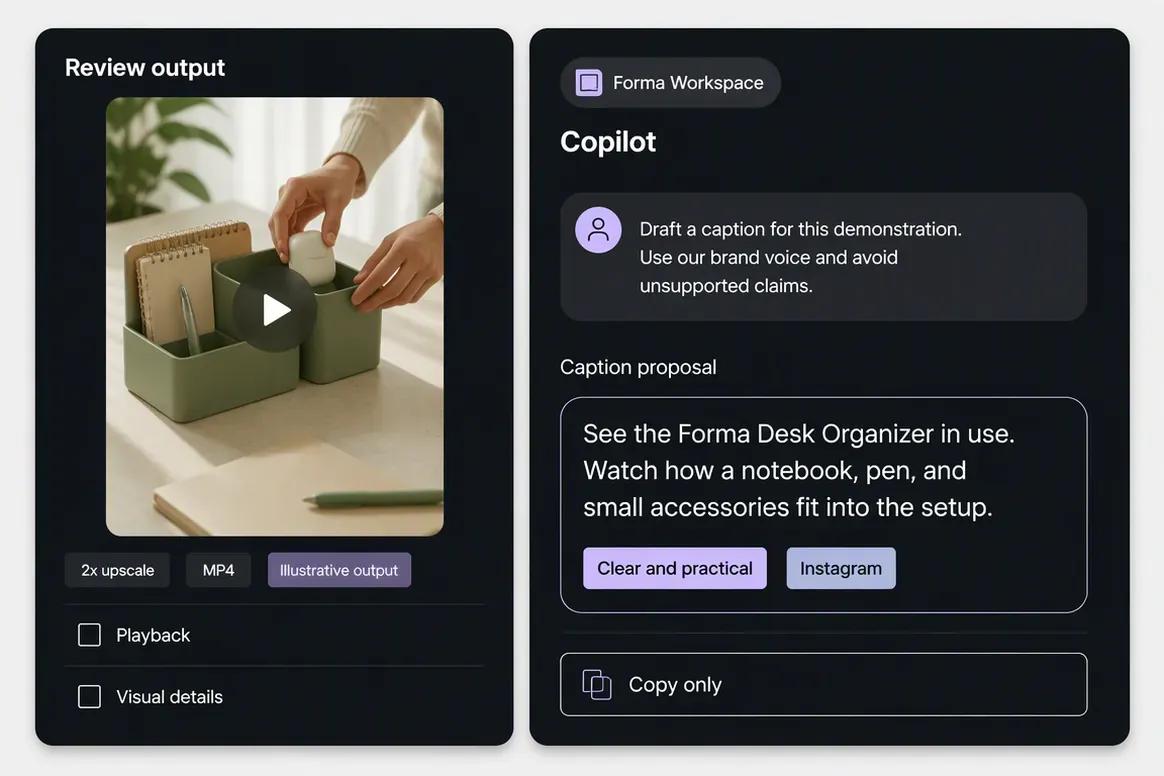
Inspect the completed video and save the approved result to the Media Library. Ask Copilot to prepare supporting copy that accurately represents the content without introducing unsupported product claims.
“Draft a caption introducing this product demonstration. Use our brand voice and avoid unsupported product claims.”
Step 4
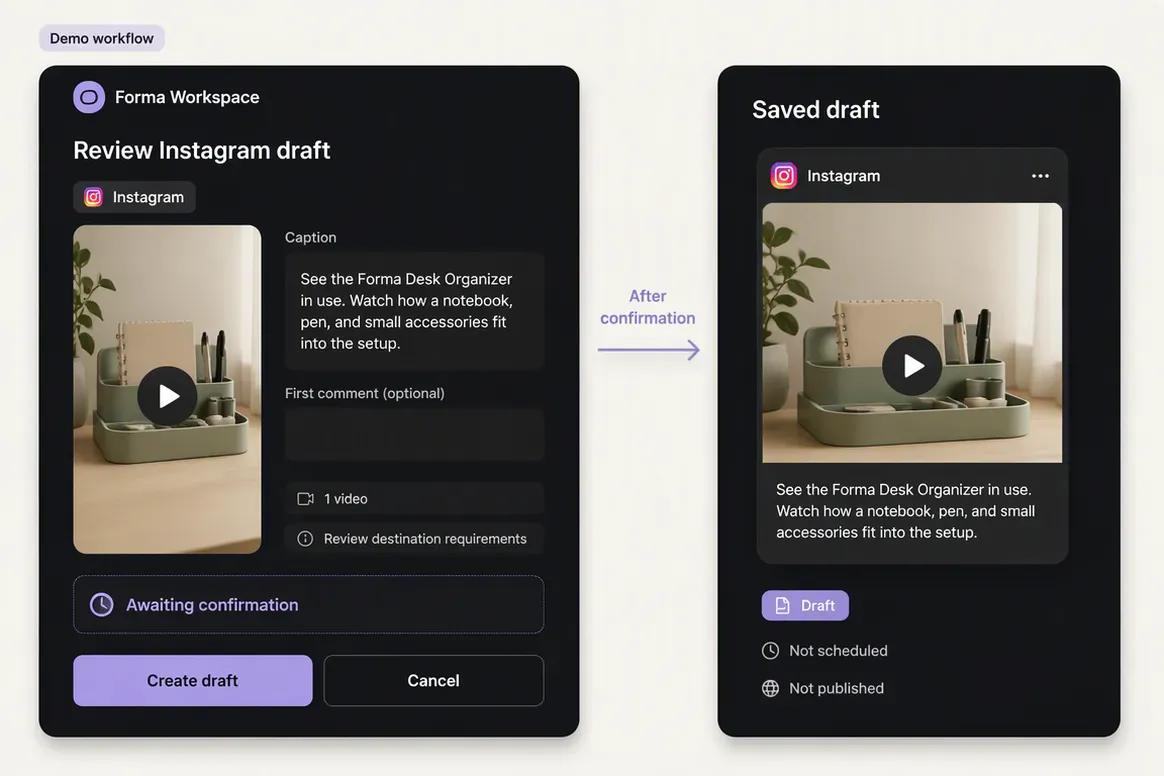
Attach the approved video to a destination-specific draft. Check the caption, destination requirements, scheduling details, and publishing action before confirmation.
“Prepare an Instagram publishing draft using this processed video and caption. Show me the final details for review.”
Move from brand context to reviewable content and supported actions without rebuilding the same marketing context across disconnected tools.
Start With OolookWhy teams choose Oolook
Oolook connects structured brand context, coordinated creative production, media processing, controlled publishing, reporting, and search-content execution.
Oolook Copilot can work with available Brand Kit information, media, connected profiles, drafts, schedules, reports, search projects, and application history.
Oolook separates recommendations from workspace changes. Supported actions are prepared for confirmation so your team can inspect what will happen before execution.
Generate images with references, coordinated carousel cards, and visual direction inside the selected brand workspace.
Find an existing asset, then resize, reframe, upscale, remove its background, extract its palette, or adjust its colors without leaving the Media Library.
Continue into researched article generation, evaluation, editing, reevaluation, and optimization without rebuilding the brand context in another product.
Where Kling AI is stronger
Kling AI has clear advantages when the buyer needs specialist video generation, camera direction, motion control, lip sync, reference consistency, or developer access.
Workflow comparison
Oolook connects creative assets to the full marketing operation. Kling AI focuses on generating, directing, refining, and exporting cinematic media.
Current pricing
Compare the brands, social profiles, posts, storage, AI credits, reporting, and support your team actually needs.
Loaded from Oolook's pricing API when this page opens.
Loading current Oolook plans…
Public pricing reviewed on October 1, 2026.
$0
Permanent Free tier with limited creation capacity under reviewed terms. Outputs include a watermark, commercial use is restricted, and model, resolution, speed, and queue limits apply.
About $10/month before promotions
Includes a reviewed monthly credit allowance, paid-model access, higher resolution, watermark removal, commercial-use rights, faster generation, and higher task capacity. Promotions and regional prices can change.
About $37/month before promotions
Includes a larger reviewed monthly credit allowance, priority access, higher generation volume, watermark removal, commercial-use rights, and access to current paid image and video models.
About $92/month before promotions
Provides a higher monthly credit allowance for agencies and production teams running more variations, revisions, effects, lip-sync tasks, and multi-shot generations.
About $180/month before promotions
Provides the highest reviewed self-serve credit allowance for heavy production, higher-resolution output, long-duration generation, and extensive iteration.
Usage-based pricing
API usage is billed separately through the developer platform. Costs vary by model, duration, resolution, effect, and generation type.
Oolook plans scale through brand workspaces, social profiles, posts, storage, AI credits, reports, and support. Kling AI plans primarily scale through generation credits, video models, resolution, duration, watermark removal, priority, and production volume. API usage is separate. Compare your video volume, retries, resolution, brand requirements, publishing needs, reporting, media processing, and SEO workflows.
Kling AI prices and limits can change after the research date. Oolook values are loaded from its pricing API. Currency conversions outside INR are approximate. Confirm taxes, promotions, add-ons, checkout currency, and final billing terms before purchasing.
Make the decision
Kling AI earns its place when cinematic video generation, motion, camera direction, lip sync, and API rendering are the main job. Oolook becomes more relevant when those assets must connect to brand context, captions, publishing, reports, and SEO content.
Questions before you choose
Straight answers to the practical questions buyers ask before choosing between Oolook and Kling AI.
Kling AI is a specialist AI video and image-generation platform. Oolook is a broader marketing workspace connecting Brand Kits, creative assets, media processing, captions, social publishing, reporting, and SEO content.
Yes, when the buyer needs AI-generated marketing assets as part of a wider content and publishing workflow. Kling AI remains the stronger specialist option when cinematic video generation is the primary requirement.
Kling AI is the stronger fit for specialist text-to-video, image-to-video, camera direction, motion controls, start and end frames, multi-shot scenes, and lip sync.
Yes. The reviewed Basic tier is free, but creation capacity is limited, outputs include a watermark, and commercial-use rights are restricted.
Yes. Kling AI supports text-to-image and image-to-image generation through its current image models.
Watermark removal is included on eligible paid plans. Free-tier outputs include Kling branding under reviewed terms.
Native social scheduling, publishing, platform validation, publication-status monitoring, and connected social analytics were not verified.
A dedicated workflow for brand-aware, platform-specific social captions and caption variants was not verified.
Oolook is likely the stronger fit when media generation must remain connected to Brand Kits, captions, carousels, Media Libraries, social publishing, reporting, and SEO content.
No. The reviewed information indicates that Kling AI API usage is priced separately from consumer subscriptions.
Oolook supports researched article generation, evaluation, editing, reevaluation, and optimization. A comparable SEO content workflow was not verified for Kling AI.
Yes. Download the final Kling AI media, upload it to the relevant Oolook Media Library, and prepare the destination-specific post inside Oolook.
Research and sources
This comparison uses established Oolook product information and the current Kling AI website, membership information, paid-service terms, privacy policies, community guidelines, API documentation, and model guides.
Kling AI is a trademark of its respective owner. Oolook is not affiliated with or endorsed by Kling AI. Product capabilities, plans, prices, limits, AI terms, integrations, and policies can change. Confirm current official information before purchasing. If you identify an inaccurate statement, contact Yogesh@oolook.in.
Build around the brand
Use Oolook to connect your Brand Kit, Copilot, creative tools, reusable Media Library, social publishing, reporting, and SEO content workflows.