Oolook vs Predis.ai

Need More Than an AI Social Post Generator?

Predis.ai helps turn prompts and product links into ads, social creatives, and UGC-style content. Oolook connects the work around creation: brand context, reusable media, publishing, reporting, and SEO content in one marketing workspace.

Comparison researched and reviewed on October 1, 2026

The short answer

Choose Based on the Work You Need to Finish

Both products generate branded social content. The meaningful difference is what you need to accomplish before and after that content appears.

Choose Oolook when generation is only one part of the job

Keep brand context, creative assets, destination-specific drafts, publishing, reporting, and SEO content connected. Move from an objective to execution without rebuilding the same context across separate tools.

Choose Predis.ai when ecommerce ads and UGC are the job

Predis.ai is the stronger fit when your main requirement is turning product links or ecommerce catalogs into product ads, UGC-style avatar videos, and multiple advertising variations.

Feature comparison

Oolook vs Predis.ai at a Glance

Compare the capabilities that change how your team creates, organizes, publishes, and improves content.

Decision areaOolookPredis.ai
Best suited toTeams that want brand context, creative production, reusable media, social publishing, reporting, and SEO content workflows in one workspace.Teams primarily focused on generating product ads, social creatives, ecommerce content, and UGC-style videos.
Multi-brand organizationBrand-specific workspaces keep Brand Kit information, media, profiles, posts, reports, and search projects separated by brand.Separate brands and workspaces are available. The number of brands depends on the selected plan.
Reusable brand contextStructured Brand Kit information can guide supported Copilot, social, visual, and SEO content workflows.Brand Kit settings apply logos, colors, tone of voice, and messaging to generated content.
AI assistantOolook Copilot can inspect available workspace information and prepare supported actions for confirmation.Predis.ai’s assistant supports post ideas, content planning, and generation prompts.
Captions and social postsGenerates captions and variants and supports independently editable content for different destinations.Generates captions, hashtags, images, carousels, and social posts from prompts, images, or product links.
Images and carouselsSupports AI image generation with references and output settings, plus multi-card carousel creation.Supports static creatives, product ads, carousels, social posts, and multiple creative variants.
UGC and product advertisingSupports creative and social workflows but is not positioned primarily as a product-to-UGC advertising generator.Strong focus on UGC-style avatar videos, product-to-ad generation, ecommerce catalogs, and advertising variants.
Existing-media processingIncludes background removal, resizing, reframing, color grading, palette extraction, and image or video upscaling.Provides built-in image and video editing, resizing, uploaded assets, templates, and stock media.
Media organizationA brand-specific Media Library supports storing, finding, processing, and reusing uploaded and generated assets.Supports uploaded assets, stock media, saved templates, and content reuse, subject to storage limits.
Social publishingSupports drafts, scheduling, publishing, platform validation, queue states, retries, and publication-status monitoring.Provides drafts, a content calendar, scheduling, publishing, best-time recommendations, and plan-dependent auto-posting.
Social reportingProvides available profile and post metrics from supported connected social networks.Provides basic auto-posting analytics, engagement information, best-time suggestions, and competitor analysis.
Competitor researchSupports competitor research within documented search-content workflows.Provides plan-limited social competitor analysis focused on Facebook and Instagram.
SEO content workflowSupports researched article workflows, generation, evaluation, editing, reevaluation, and optimization.A complete SEO research, scoring, article-audit, and optimization suite was not verified in the reviewed official material.
Team workflowsSupports reviewable Copilot actions and shared-content feedback. Seats, permissions, and allowances depend on the selected plan.Offers unlimited team members, permissions, approval tools, draft management, and shareable approval links on paid plans.
AI usageAI-powered work consumes plan credits. Standard scheduling, publishing, reporting, brand management, and Media Library storage do not consume AI credits.Generative work consumes monthly credits. Credit use varies by content format and model.
Pricing modelOffers standard Free, monthly, annual, and custom Enterprise options. Current prices and allowances are loaded from Oolook’s pricing API.Offers monthly and annual subscriptions with plan-specific brand, channel, and monthly credit limits.

Product capabilities and plan limits can change. Confirm every purchase-critical requirement on each vendor's current official product and pricing pages.

Oolook Copilot in action

Move From a Campaign Objective to Brand-Aware Execution

Keep the campaign brief, brand context, creative production, destination adaptation, and publishing workflow connected. See how this connected Oolook workflow relates to teams evaluating Predis.ai.

Oolook Copilot

Brand-aware content preparation

Working in: Alder & Form
Ask anything
Brand details shown here are fictional. Actual output uses available information from the selected Brand Kit.
Prepare coordinated campaign contentAdapt content for each destinationConfirm execution and review results
  1. 1

    Step 1

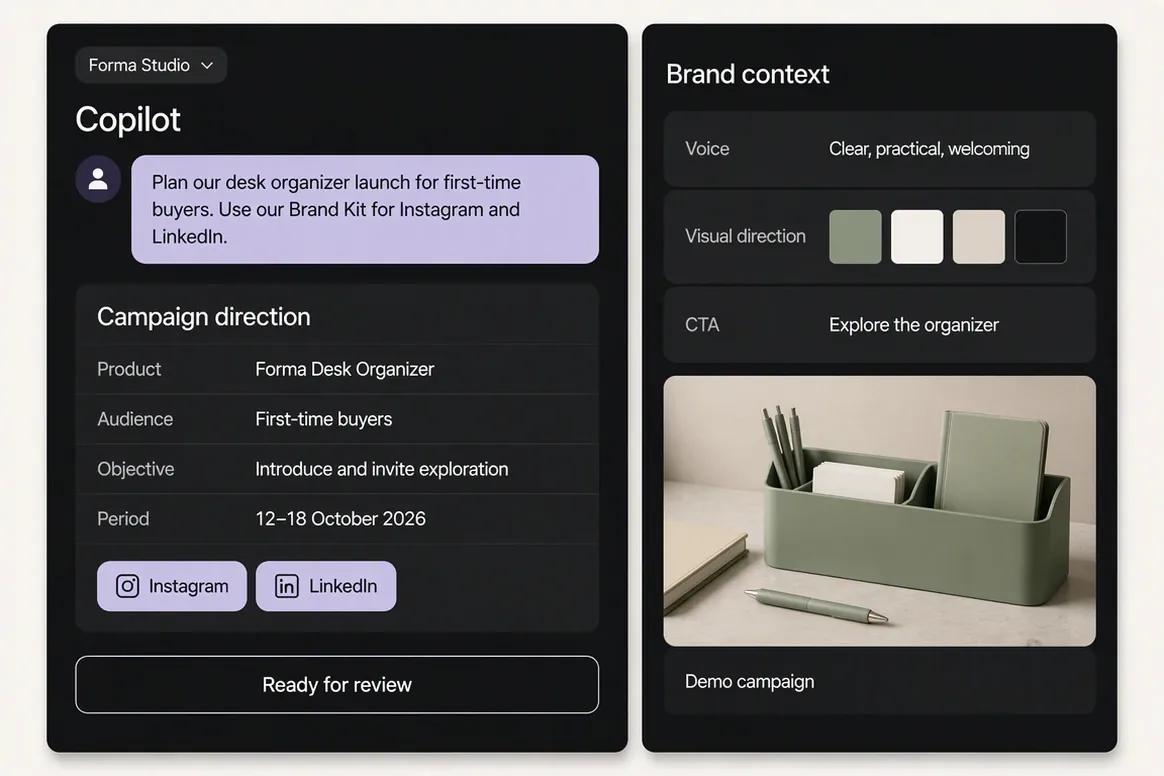
    Give Copilot the campaign brief

    Provide the offer, audience, objective, campaign period, and intended destinations. Copilot can inspect available Brand Kit context, organize the brief, and identify missing campaign information before content production begins.

    Ask Oolook Copilot
    “Help me prepare a campaign for our new product launch. Target first-time buyers, use our Brand Kit, and focus on Instagram and LinkedIn.”
    Oolook Copilot organizing a product launch campaign brief
  2. 2

    Step 2

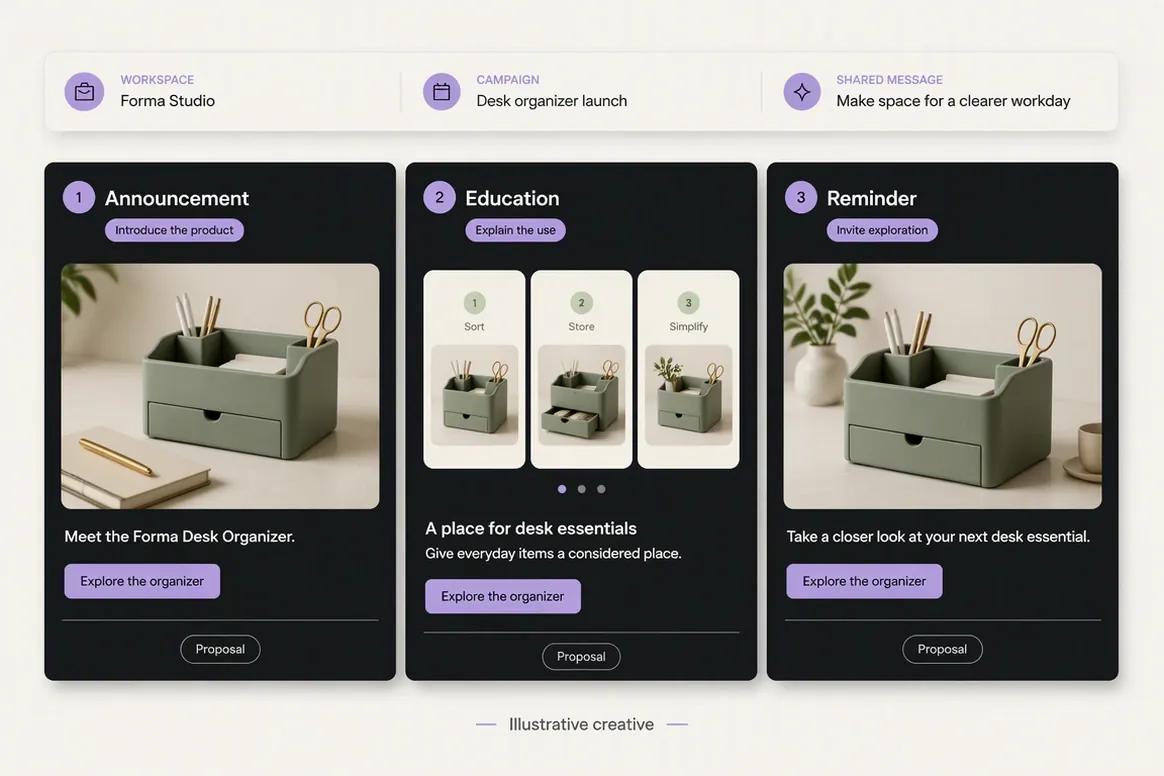
    Prepare coordinated campaign content

    Ask Copilot to develop a connected set of posts with distinct jobs inside the campaign. The messaging should remain consistent while the announcement, educational content, proof, and reminder posts each serve a different purpose.

    Ask Oolook Copilot
    “Prepare a launch announcement, an educational post, and a reminder post. Keep the messaging consistent and give each post a distinct purpose.”
    Oolook Copilot preparing coordinated campaign content
  3. 3

    Step 3

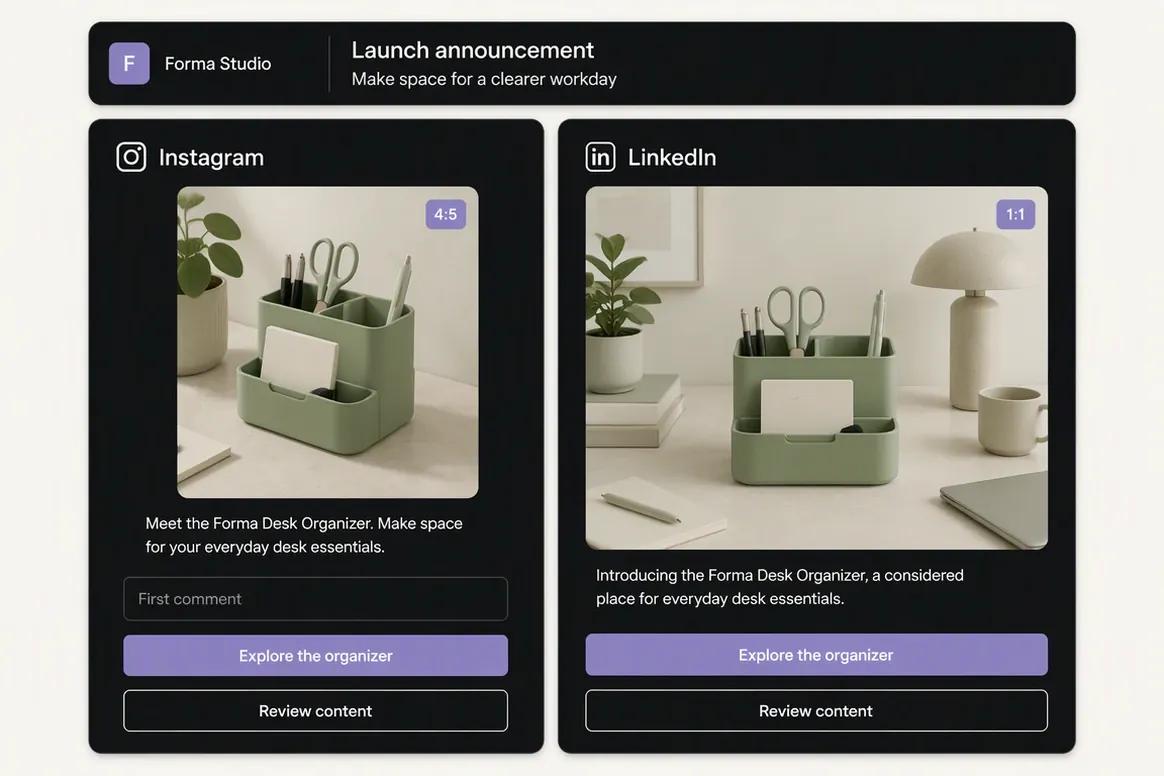
    Adapt content for each destination

    Review how each post changes for the selected social destination. Check the caption, call to action, media, formatting, and supported settings while preserving the central campaign message.

    Ask Oolook Copilot
    “Adapt the launch announcement for Instagram and LinkedIn. Show me the differences in copy and media for each destination.”
    Oolook destination-specific campaign drafts for Instagram and LinkedIn
  4. 4

    Step 4

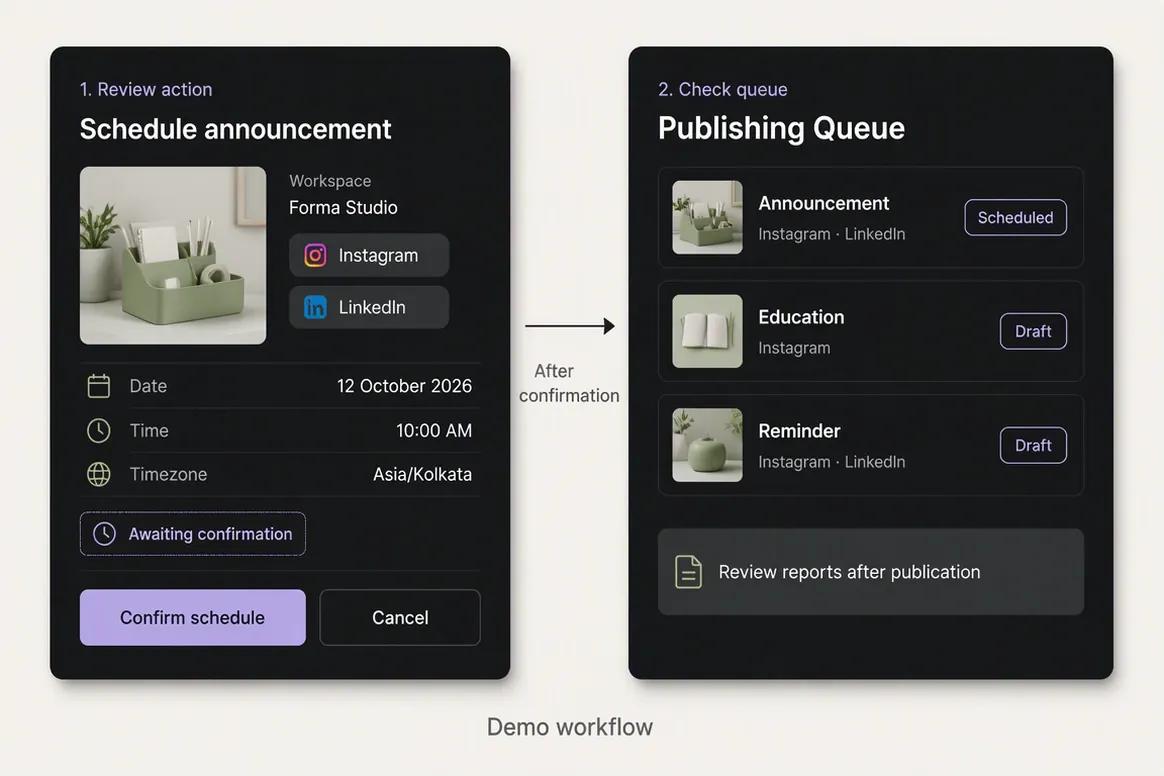
    Confirm execution and review results

    Approve the final content and confirm the supported publishing actions. Monitor publication status and return to the available reports after the campaign has collected enough performance data.

    Ask Oolook Copilot
    “Prepare the approved campaign posts for scheduling and show me every action before confirmation.”
    Oolook campaign posts prepared for controlled scheduling

Keep the Work Connected With Oolook Copilot

Move from brand context to reviewable content and supported actions without rebuilding the same marketing context across disconnected tools.

Start With Oolook

Why teams choose Oolook

Your Work Does Not End When AI Generates a Post

Oolook connects the work around content creation so your team can move from brand context to execution without rebuilding the process elsewhere.

Start with your workspace—not a blank AI chat

Oolook Copilot can work with available Brand Kit information, media, connected profiles, drafts, schedules, reports, search projects, and application history. You spend less time rebuilding context before asking for help.

Reuse the assets you already paid to create

Find an existing asset, then resize, reframe, upscale, remove its background, or adjust its colors. Oolook connects generation and media processing instead of forcing every task to begin with a new prompt.

Keep control from draft to publication

Prepare content for each destination, check supported platform requirements, schedule it, and monitor whether it is queued, processing, published, failed, or waiting for reconnection.

Run social and SEO content from the same brand context

Move from social execution to researched article generation, evaluation, editing, reevaluation, and optimization without rebuilding your brand context in another content tool.

Where Predis.ai is stronger

Need to Turn Products Into Ads Quickly?

Predis.ai has clear advantages when ecommerce creative and UGC-style advertising are the center of your workflow.

Generate creative directly from product links and ecommerce catalogs.
Create UGC-style avatar videos and advertising-focused formats.
Produce product ads and multiple creative variants quickly.
Analyze competitor activity on Facebook and Instagram.
Add unlimited team members on the reviewed paid plans.
Embed content-generation workflows through its API and SDK.

Workflow comparison

What Happens After You Enter the Prompt?

The products overlap at content generation, but they are designed around different end-to-end workflows.

With Oolook

  1. 1Set up a workspace and add your structured Brand Kit.
  2. 2Connect supported social profiles and organize reusable media.
  3. 3Ask Copilot to inspect available workspace information or prepare content.
  4. 4Generate new creative or adapt an existing asset.
  5. 5Edit captions, media, and settings for each destination.
  6. 6Confirm supported actions and monitor publication status.
  7. 7Review available reports or continue into an SEO article workflow.

With Predis.ai

  1. 1Set up a brand with its visual and messaging information.
  2. 2Enter a product link, prompt, image, or ecommerce-catalog item.
  3. 3Generate a post, carousel, product ad, or UGC-style creative.
  4. 4Edit the visual, video, caption, and call to action.
  5. 5Generate additional creative variants when required.
  6. 6Add the content to the calendar and publish according to the plan.
  7. 7Review available performance and social competitor information.

Current pricing

Compare Plans Against Your Real Monthly Workload

Compare the brands, social profiles, posts, storage, AI credits, reporting, and support your team actually needs.

Current Oolook plans

Loaded from Oolook's pricing API when this page opens.

Open the standard pricing page

Loading current Oolook plans…

Predis.ai plans

Public pricing reviewed on October 1, 2026.

Check current Predis.ai pricing

Predis.ai Core

$24/month billed annually or $32 monthly

1 brand, 10 channels, 1,300 monthly credits, unlimited team members, and 60 competitor-analysis runs per month.

Predis.ai Rise

$55/month billed annually or $79 monthly

Up to 4 brands, 20 channels, 3,200 monthly credits, auto-posting, and 130 competitor-analysis runs per month.

Predis.ai Enterprise+

$212/month billed annually or $249 monthly

Unlimited brands, 60 channels, 10,000 monthly credits, auto-posting, and 600 competitor-analysis runs per month.

Do not compare price without comparing usage

Both products meter AI-powered work. Estimate your monthly images, carousels, videos, caption variants, media jobs, brands, connected profiles, scheduled posts, team members, and reporting needs before choosing a plan.

Predis.ai prices and limits can change after the research date. Oolook values are loaded from its pricing API. Currency conversions outside INR are approximate. Confirm taxes, promotions, add-ons, checkout currency, and final billing terms before purchasing.

Make the decision

Choose the Product That Matches Your Main Job

Do not buy a broader workspace when all you need is ecommerce ad generation. Do not buy a creative generator when the real problem is keeping your marketing operation connected.

Oolook is likely the better fit if:

  • You want more than an AI social-post generator.
  • Your brand information needs to remain connected to daily execution.
  • You want Copilot to inspect available workspace information.
  • You need reviewable actions instead of uncontrolled automation.
  • You regularly adapt and reuse existing creative assets.
  • You need destination-specific publishing controls and job states.
  • You want social content and SEO article workflows together.

Predis.ai is likely the better fit if:

  • Product-link or ecommerce-catalog generation is central to your workflow.
  • UGC-style avatar videos are a primary content format.
  • You need a strong focus on product ads and advertising variants.
  • Facebook and Instagram competitor analysis is important.
  • You need unlimited team members on a paid subscription.
  • You want to embed creative generation through an API or SDK.

Questions before you choose

Oolook vs Predis.ai FAQs

Straight answers to the questions that matter before you commit to a platform.

What is the main difference between Oolook and Predis.ai?+

Predis.ai focuses heavily on generating social creatives, product advertisements, UGC-style videos, and ecommerce content. Oolook connects brand context, creative tools, reusable media, social publishing, reporting, and SEO content workflows in a broader marketing workspace.

Is Oolook a Predis.ai alternative?+

Yes, when you are comparing brand-aware AI content creation, multi-brand organization, social scheduling, publishing, and analytics. Predis.ai has a stronger documented focus on ecommerce ads and UGC-style video, while Oolook covers more of the workflow surrounding content creation and execution.

Which product is better for ecommerce advertising?+

Predis.ai is likely the better fit when product-link generation, ecommerce-catalog synchronization, UGC-style avatar videos, and high-volume advertising variants are your main requirements.

Which product is better for a connected marketing workflow?+

Oolook is designed for buyers who want Brand Kit context, workspace-aware assistance, creative generation, existing-media processing, a reusable Media Library, controlled social publishing, reporting, and SEO article workflows together.

Do Oolook and Predis.ai support multiple brands?+

Yes. Both products organize work by brand. Oolook’s brand allowance depends on the current plan displayed on this page. The reviewed Predis.ai plans provide one brand on Core, up to four on Rise, and unlimited brands on Enterprise+.

How do Oolook AI credits work?+

Oolook uses plan credits for AI-powered work. Standard scheduling, publishing, reporting, brand management, and Media Library storage do not consume AI credits. The current credit allowance for each standard plan is shown in the pricing section.

How do Predis.ai credits work?+

Predis.ai provides a monthly credit allowance based on the selected plan. Generating images, videos, UGC-style content, and other creative formats consumes credits at different rates.

Does Oolook offer monthly and annual plans?+

Yes. Oolook’s standard pricing includes available Free, monthly, annual, and custom Enterprise options. The plans returned by Oolook’s current pricing API are displayed on this page.

Does Predis.ai include auto-posting on every plan?+

The reviewed pricing information lists auto-posting on Rise and Enterprise+. Core does not list the same auto-posting entitlement. Check the current Predis.ai pricing page before purchasing because plans can change.

Can either product guarantee engagement or sales?+

No. Results depend on your offer, audience, creative quality, execution, market, platform algorithms, and other external factors. Neither product should be treated as a guarantee of traffic, engagement, leads, conversions, or revenue.

Research and sources

Check the Details That Matter to Your Purchase

This comparison uses Oolook product information and official Predis.ai product, pricing, and developer sources.

Predis.ai is a trademark of its respective owner. Oolook is not affiliated with or endorsed by Predis.ai. Product capabilities, prices, limits, and terms can change. If you identify an inaccurate statement, contact Yogesh@oolook.in.

Keep your marketing connected

Stop Rebuilding the Same Brand Context in Every Tool

Bring your Brand Kit, Copilot, creative tools, media, social publishing, reporting, and SEO content workflows into one workspace.