Choose Oolook for connected marketing execution
Oolook is the stronger fit when brand context, creative assets, organic social publishing, reports, and SEO content must remain connected inside the same workspace.
Solutions
Solutions OverviewMarketing AgenciesSmall BusinessesSocial Media ManagersMarketing TeamsContent CreatorsMulti-Brand MarketingBy Outcome
Social Media CampaignsSeasonal MarketingProduct Launch ContentEvent PromotionBrand-Consistent ContentContent RepurposingCross-Platform ContentMarketing Asset ReuseProduct EducationEducational ContentCustomer Story ContentSEO Blog ProductionBlog Content RefreshContent Performance ReviewPricingResourcesRunway specializes in cinematic AI video, generative editing, character performance, audio, and paid creative. Oolook connects brand context, organic social publishing, media operations, reporting, and SEO content workflows.
Comparison researched and reviewed on October 2, 2026
The short answer
These products overlap in selected capabilities, but their strongest use cases and operating models are different.
Oolook is the stronger fit when brand context, creative assets, organic social publishing, reports, and SEO content must remain connected inside the same workspace.
Runway is the stronger fit when cinematic video generation, performance transfer, in-context editing, audio tools, custom creative models, or media API access are the primary requirements.
Feature comparison
Compare what each product contributes to brand management, creative production, publishing, analytics, collaboration, and cost.
| Decision area | Oolook | Runway |
|---|---|---|
| Best suited to | Marketing teams that need brand context, creative assets, organic social publishing, reports, and SEO content workflows connected. | Filmmakers, VFX artists, creative studios, agencies, developers, and marketing teams that need professional AI video generation and post-production. |
| Core product focus | A brand-aware marketing execution workspace. | A specialist generative media, cinematic video, character-performance, VFX, and creative-production platform. |
| Brand Kits | Brand Kits connect identity, audience, positioning, writing preferences, visual direction, social content, media, and SEO workflows. | Brand Kits store visual references, logos, colors, fonts, characters, and descriptive guidance for media generation. |
| Workspaces | Brand-specific workspaces separate context, media, connected profiles, posts, reports, and search projects. | Personal subscriptions can use separate workspaces. Team provides a shared workspace, pooled credits, shared projects, comments, assets, and higher Brand Kit limits. |
| Workspace-aware assistant | Copilot can inspect available workspace information and prepare supported actions for confirmation. | Runway provides an agentic creative collaborator for prompts, projects, generation, and connected creative context. |
| Caption generation | Generates social captions and variants with supported brand and destination context. | Social caption generation is not positioned as a core Runway workflow. |
| Image generation | Generates marketing images using prompts, references, aspect ratios, resolution controls, and multiple outputs. | Provides text-to-image, image-to-image, reference consistency, expansion, editing, outpainting, background tools, and access to several image models. |
| Video generation | Established Oolook scope focuses on video processing rather than unrestricted professional text-to-video generation. | Provides professional text-to-video, image-to-video, video-to-video, reference-to-video, keyframes, motion controls, consistency, extension, and upscaling. |
| Video models | Oolook is not positioned as a frontier cinematic-video model platform. | Reviewed active models include Gen-4.5, Gen-4, Gen-4 Turbo, Aleph 2.0, Act-Two, Seedance 2.5, Veo 3.1, and additional routed models. |
| Character performance | Rigless cinematic performance transfer is outside the established Oolook scope. | Act-Two transfers facial expressions, eye lines, body motion, gestures, pacing, and voice performance from recorded video to AI characters. |
| In-context video editing | Provides focused processing tools such as background removal and upscaling. | Aleph 2.0 supports prompt-based editing of video elements while preserving surrounding motion, lighting, and scene context. |
| Audio | Audio-generation and voice-cloning tools are not used as established Oolook advantages here. | Provides text-to-speech, speech-to-speech, custom voices, sound effects, music tools, and audio-driven character workflows. |
| Media processing | Supports image and video background removal, resizing, reframing, color tools, and upscaling. | Provides generative editing, object and background changes, expansion, video lighting, color grading, background removal, and 4K upscaling on eligible plans. |
| Carousel generation | Generates coordinated multi-card social carousels from topics, references, website context, and Brand Kit information. | A comparable coordinated social-carousel workflow was not verified. |
| Moodboards | Turns references and brand context into reusable visual direction. | Visual references and Brand Kits can guide generation, but an equivalent marketing moodboard-analysis workflow was not verified. |
| Asset management | A brand-specific Media Library connects uploads, generated outputs, search, processing, organization, and reuse. | Assets are organized through workspaces, projects, folders, shared team libraries, generated outputs, downloads, and plan-based storage. |
| Organic social publishing | Supports drafts, destination-specific settings, validation, scheduling, publishing, retries, and status monitoring. | A native organic social calendar and direct organic scheduling workflow were not verified. |
| Paid advertising | Paid ad campaign management is not used as an established Oolook advantage. | Runway Ads generates creative variants, connects ad accounts, publishes to supported paid platforms, reads performance, and iterates creative. |
| SEO workflows | Supports researched article generation, evaluation, editing, reevaluation, and optimization. | Native keyword research, SERP analysis, content scoring, article workflows, and AI-search visibility tools were not verified. |
| API | Public generative-media API access is not used as an Oolook advantage here. | Provides a pay-as-you-go developer API for supported video, editing, performance-capture, image, and model-routing workflows. |
| Free access | Offers a permanent standard Free plan with current limits loaded from its pricing API. | Provides a Free plan with 125 one-time credits, 5 GB storage, and watermarked outputs. |
Product names, plans, prices, model access, integrations, platform APIs, and commercial terms can change. Confirm purchase-critical requirements on each vendor's current official pages.
Find existing media, run supported processing, prepare accompanying copy, and connect the result to social execution. See how this connected Oolook workflow relates to teams evaluating Runway.
Oolook Copilot
Media Library discovery
Step 1
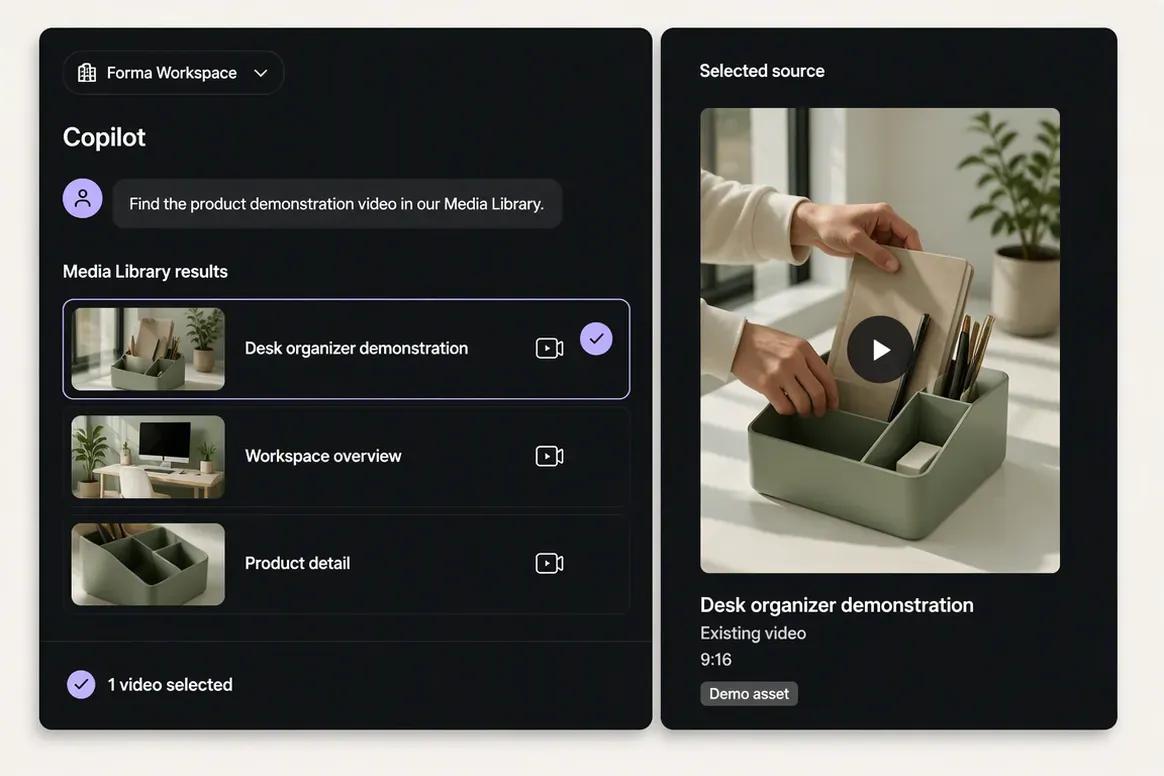
Upload the finished source video or ask Copilot to locate it inside the selected brand's Media Library. Confirm that the correct asset has been selected before processing begins.
“Find the product demonstration video in our Media Library and show me the matching results.”
Step 2
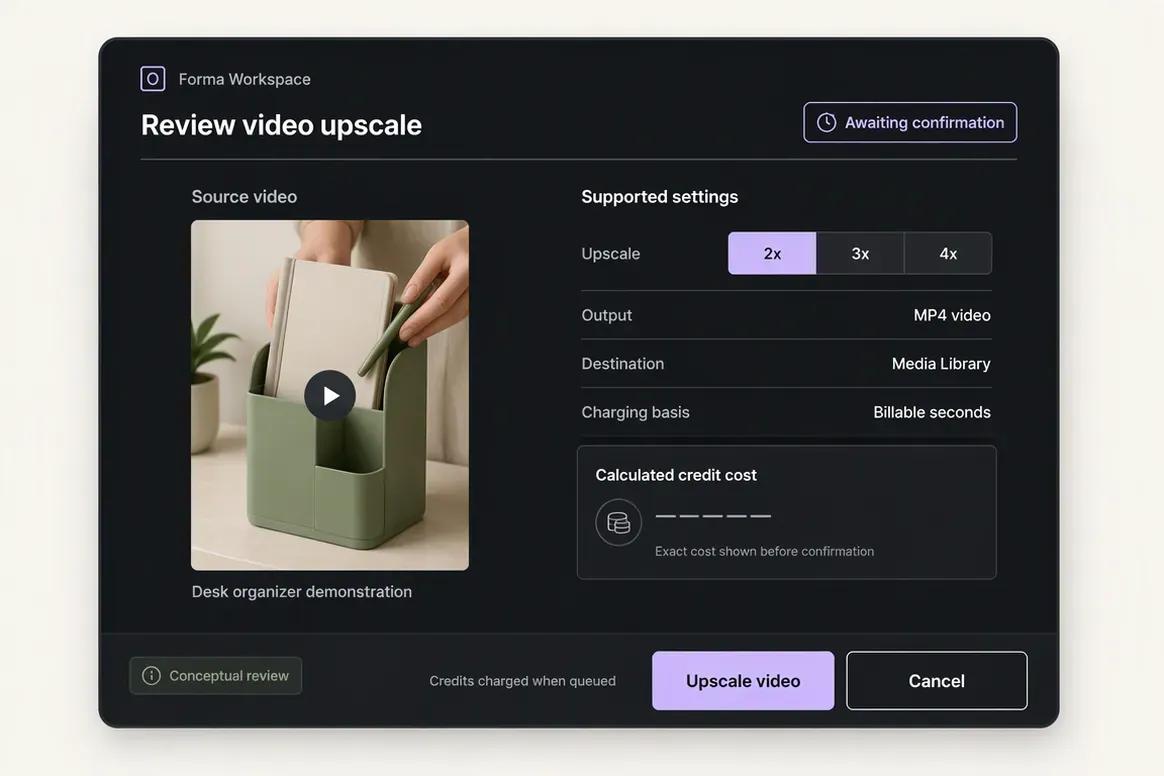
Choose the processing operation required for the selected video. Copilot prepares the supported action and settings for review before the processing task is submitted.
“Prepare a video upscale for this asset. Show me the supported scale and expected action before running it.”
Step 3
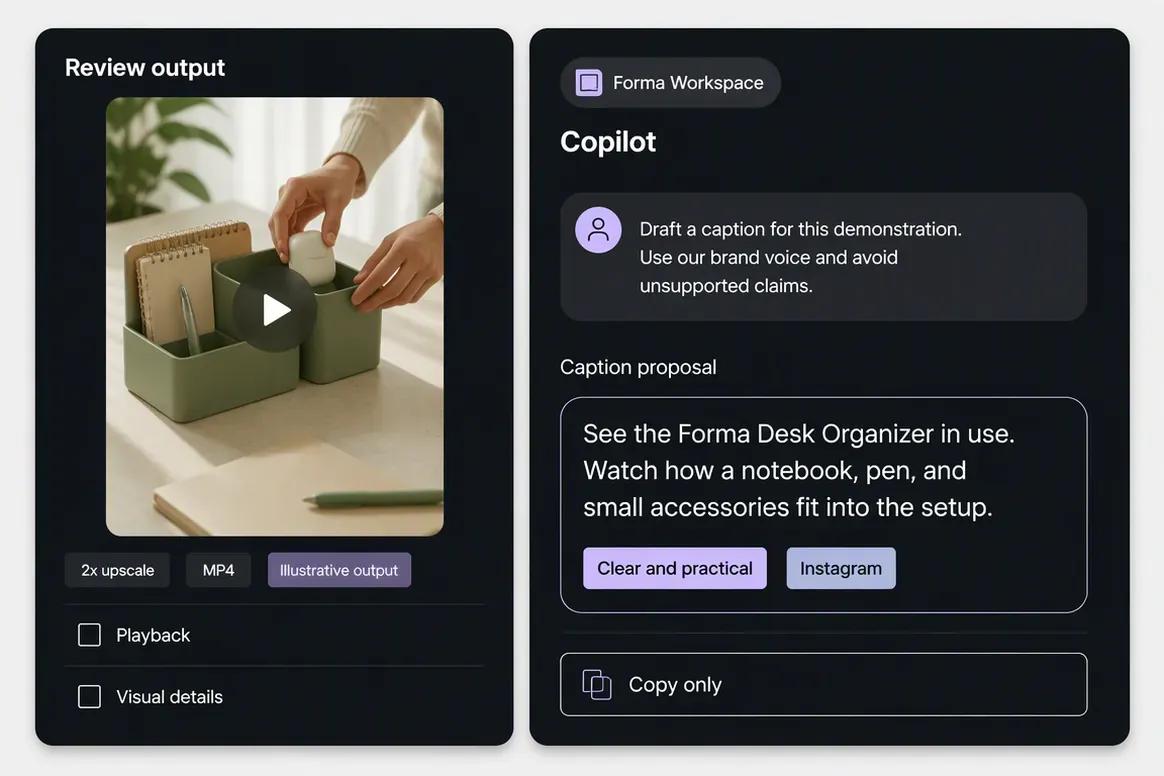
Inspect the completed video and save the approved result to the Media Library. Ask Copilot to prepare supporting copy that accurately represents the content without introducing unsupported product claims.
“Draft a caption introducing this product demonstration. Use our brand voice and avoid unsupported product claims.”
Step 4
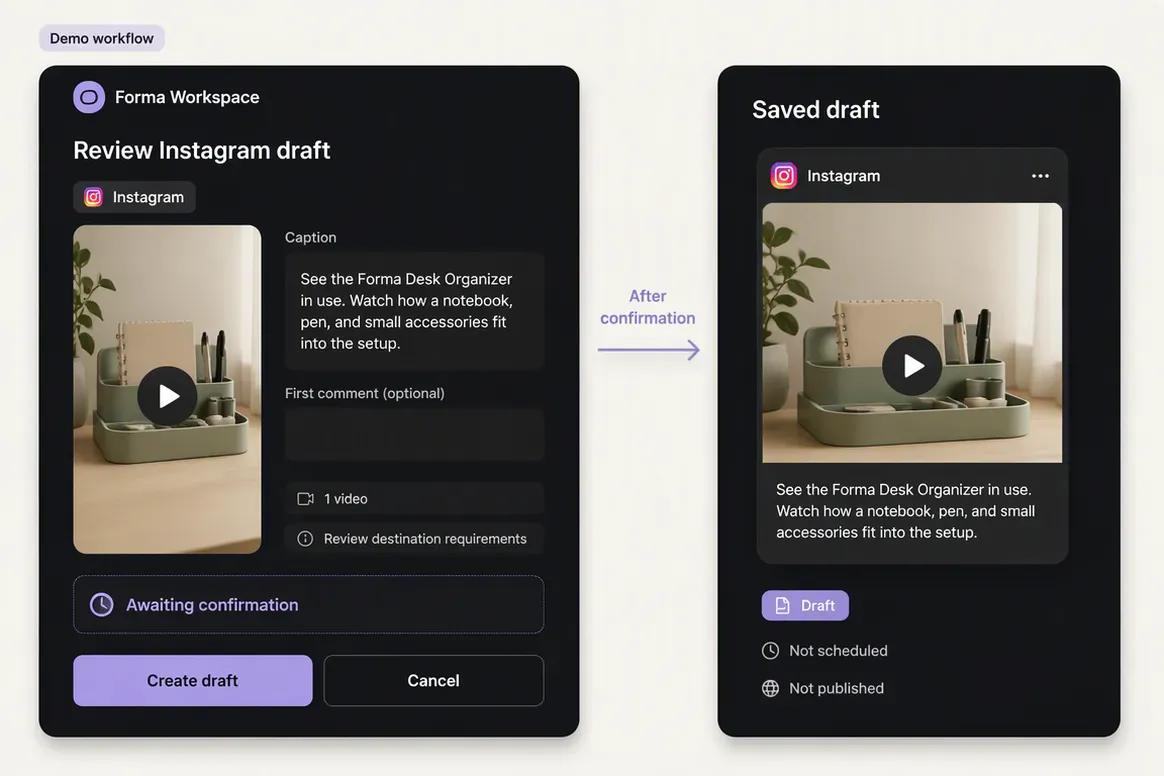
Attach the approved video to a destination-specific draft. Check the caption, destination requirements, scheduling details, and publishing action before confirmation.
“Prepare an Instagram publishing draft using this processed video and caption. Show me the final details for review.”
Move from brand context to reviewable content and supported actions without rebuilding the same marketing context across disconnected tools.
Start With OolookWhere Oolook stands apart
Oolook covers brand, media, organic social, reporting, and SEO work that focused point solutions may leave to separate tools.
Oolook connects structured Brand Kit information with Copilot, creative tools, reusable media, social publishing, reports, and SEO content workflows.
Oolook separates recommendations from workspace mutations. Supported changes are presented for confirmation before they are applied.
Generate captions, images, coordinated carousels, and visual direction, then resize, reframe, remove backgrounds, adjust colors, and upscale supported media.
Move from social execution into researched article generation, evaluation, editing, reevaluation, and optimization without rebuilding the brand context elsewhere.
Where Runway is stronger
A credible comparison should acknowledge the capabilities for which Runway may be the better fit.
Workflow comparison
Oolook starts with a brand workspace and connects creation to distribution. Runway starts with its specialist production or market workflow.
Current pricing
Compare the brands, social profiles, posts, storage, AI credits, reporting, and support your team actually needs.
Loaded from Oolook's pricing API when this page opens.
Loading current Oolook plans…
Public pricing reviewed on October 2, 2026.
$0
Includes 125 one-time credits, 5 GB storage, watermarked outputs, and limited model access for testing.
$15/month or $12/month billed annually
Includes 625 monthly credits, 20 GB storage, one Brand Kit, five parallel generations, and unwatermarked exports under reviewed terms.
$35/month or $28/month billed annually
Includes 2,250 monthly credits, 100 GB storage, one Brand Kit, 15 parallel generations, and unlimited reviewed 4K upscaling.
$95/month
Includes 9,500 monthly credits, 500 GB storage, three Brand Kits, 20 parallel generations, faster access, and limited credit rollover under reviewed terms.
$69/seat monthly or $55/seat monthly billed annually
Supports 2 to 9 seats, pooled credits at 6,900 per seat, 1 TB storage, shared projects, comments, team collaboration, and up to 100 Brand Kits.
The products solve different jobs. Oolook plans scale through brands, social profiles, posts, storage, AI credits, reports, and support. Runway plans scale through media credits, models, generation duration, storage, parallel jobs, Brand Kits, seats, and API usage. Compare organic marketing needs separately from professional media-generation volume.
Runway prices and limits can change after the research date. Oolook values are loaded from its pricing API. Currency conversions outside INR are approximate. Confirm taxes, promotions, add-ons, checkout currency, and final billing terms before purchasing.
Make the decision
Runway earns its place when professional video generation and VFX are the central job. Oolook becomes more relevant when brand context, organic distribution, reports, and SEO execution must remain connected.
Questions before you choose
Straight answers to practical questions buyers ask before choosing between Oolook and Runway.
Runway is a specialist generative-media and VFX platform for cinematic video, image generation, character performance, audio, and editing. Oolook is a marketing execution workspace for brand context, organic social publishing, media operations, reporting, and SEO content workflows.
Runway is the stronger fit for professional text-to-video, image-to-video, video-to-video, cinematic controls, character performance, and in-context editing.
Oolook is the stronger fit for organic drafts, channel-specific content, scheduling, publishing, platform validation, retries, and publishing-status monitoring.
Yes. Runway Brand Kits organize visual references, logos, colors, fonts, characters, and descriptive guidance. Oolook Brand Kits connect a broader set of identity, audience, writing, visual, social, and SEO context.
Aleph 2.0 is an in-context video-editing model that can change selected elements through prompts while preserving surrounding motion, lighting, and scene context.
Act-Two transfers a recorded human performance, including expressions, eye lines, gestures, body motion, pacing, and voice, onto an AI character.
Runway Ads supports selected paid advertising workflows. A native organic social calendar and broad organic scheduling workflow were not verified.
Native keyword research, competitor SERP analysis, content scoring, article generation, page audits, topical maps, and AI-search visibility tracking were not verified.
Generative models consume credits based on the selected model and output duration or type. Credit costs vary significantly, so users should calculate expected experimentation and final-output volume before selecting a plan.
Not for professional cinematic video generation, rigless performance capture, advanced generative editing, or frontier video API access.
Not for teams that need organic social scheduling, destination-specific publishing, connected social reporting, structured SEO article workflows, and broader marketing execution.
A team can use Runway to generate advanced video assets and Oolook to organize brand context, prepare supporting content, manage organic publishing, review reports, and run SEO workflows.
Research and sources
This comparison uses established Oolook information and official Runway model, credit, API, Team, Ads, Academy, and workflow sources.
Runway is a trademark of its respective owner. Oolook is not affiliated with or endorsed by Runway. Product capabilities, prices, models, integrations, limits, and policies can change. Confirm current official information before purchasing. If you identify an inaccurate statement, contact Yogesh@oolook.in.
Build beyond asset generation
Use Oolook to connect your Brand Kit, Copilot, creative tools, reusable Media Library, social publishing, reporting, and SEO content workflows.